

TL;DR: A mutual action plan (MAP) for SaaS onboarding names every task, owner, due date, dependency, and risk between your team and the customer. The three filled-out examples below show what that looks like for a mid-market CRM rollout, an enterprise multi-workstream implementation, and a time-boxed onboarding sprint. Each assigns dual ownership (vendor and customer tasks) and flags dependencies and risks before they become blockers. Running the MAP in TaskRay can cut manual handoff work and status-call volume because the plan auto-launches from the closed deal and stays current without re-entering data. FieldEdge by Xplor cut time-to-go-live by 40 to 50 days after standardizing onboarding workflows in TaskRay templates. Evaluate your current MAP against the seven-point self-assessment at the end, covering ownership, critical path, executive sponsorship, dependencies, risks, customer access to the plan, and live data updates.
You inherit a deal from sales with a list of promises and no owners, and your job is to turn that list into a shared agreement about who does what, by when, and what happens if a dependency slips. Blank templates and abstract advice don’t show you what a finished plan looks like. This piece shows three filled-out, annotated examples based on common SaaS onboarding motions. Each names owners, dates, dependencies, and risks, because a MAP without those four elements is a wish list.
Three elements determine whether your plan survives past week one.
A MAP needs a timeline both sides can read in ten seconds. In this hypothetical mid-market SaaS onboarding, the kickoff call is on January 5, 2026, and the milestone dates below are illustrative, so replace them with dates based on the scope in your closed deal:
| Milestone | Example Calendar Date | Weeks from Kickoff |
|---|---|---|
| Kickoff call (project start) | January 5 | 0 |
| Discovery complete | January 16 | 2 |
| Configuration freeze | February 13 | 6 |
| User acceptance testing (UAT) start | February 20 | 7 |
| Go-live | March 6 | 9 |
| Stabilization end | March 20 | 11 |
A standard nine-phase CRM implementation covers the full delivery arc, and a typical mid-market deployment runs eight to twelve weeks. The six milestones in the table above condense those nine phases into the checkpoints both sides track on a status call, so every milestone needs a calendar date, not a relative label like “week three.”
Every task in a MAP has one named owner on either the vendor side or the customer side. When two people own a task, neither is accountable when it slips, so name one accountable person with authority and a deadline for each item. The ownership rules that prevent bottlenecks:
A MAP assigns tasks to roles, not just names, so the plan survives a staffing change. A typical SaaS implementation involves an executive sponsor, project manager, IT, and other specialized roles including security, data owners, procurement, legal, finance, and user representatives. Here is how responsibilities map to MAP tasks:
| Role | Responsibilities | MAP Tasks They Own |
|---|---|---|
| Implementation Manager (Vendor) | Timeline, escalation, resource coordination | Kickoff, status calls, go-live checklist, hypercare |
| Solutions Architect (Vendor) | Technical design, configuration, integration | Environment setup, application programming interface (API) configuration, data mapping |
| Customer Success Manager (CSM) (Vendor) | Adoption, training, post-launch handoff | Training sessions, adoption metrics, customer success (CS) handoff |
| Customer Project Lead | Customer-side coordination, internal stakeholders | Requirements sign-off, UAT coordination, internal comms |
| Customer IT Lead | Access, security review, integration endpoints | Single sign-on (SSO) setup, API key provisioning, network rules |
| Executive Sponsor (Both) | Scope decisions, budget approval, escalation point | Change control approvals, go/no-go decision |
Here is a filled-out mutual action plan for a mid-market CRM rollout, with kickoff on January 5, 2026 and a go-live date of March 6, 2026. The dates are examples, so replace them with dates based on the scope in your own deal.
The illustrative MAP spans about nine weeks from the January 5 kickoff to the March 6 go-live, with two additional weeks of hypercare. Treat these dates as an example and replace them with dates based on your own deal scope:
| Task | Owner (Side) | Due Date | Status | Dependency/Risk |
|---|---|---|---|---|
| Security review and non-disclosure agreement (NDA) execution | Customer IT Lead | January 9 | Complete | Blocks all technical work |
| API key provisioning for integration | Customer IT Lead | January 16 | Complete | Blocks sandbox configuration |
| Data migration field mapping document | Solutions Architect (Vendor) | January 23 | Complete | Depends on discovery sign-off |
| Sandbox environment configuration | Solutions Architect (Vendor) | February 6 | In Progress | Depends on API keys |
| UAT script development | Implementation Manager (Vendor) | February 13 | Not Started | Depends on configuration freeze |
| User acceptance testing execution | Customer Project Lead | February 27 | Not Started | Depends on UAT scripts |
| Go/no-go decision | Executive Sponsor (Both) | March 4 | Not Started | Depends on UAT sign-off |
The first two weeks can set the tone for the entire project. If discovery is rushed or kickoff lacks the right people, downstream tasks can inherit that risk. Evercheck’s implementation best practices recommend that the project lead provide a full resource list and include all necessary parties on the initial kickoff call. In this hypothetical example, the team sets discovery to finish by January 16 and agrees on its scope at kickoff, such as workflows, integrations, and reporting needs. The customer project lead then signs off on requirements, and the executive sponsor approves scope and budget, before configuration begins. Adjust the dates and scope to match your own deal.
Testing can stall a CRM implementation when customers underestimate UAT time and vendors underestimate bug triage cycles. A CRM implementation guide recommends setting measurable milestones, such as 90% of the sales team logging activity within 45 days of go-live. In this hypothetical example, UAT starts February 20 and testing finishes by February 27, with sign-off by March 3 so the executive sponsor can make the go/no-go decision on March 4. UAT length varies with deal complexity, so set your own dates from the scope you agreed at kickoff.
The stretch from production data migration on March 4 through stabilization on March 20 carries a lot of risk because a single missed step can cascade into a delayed go-live:
| Task | Owner | Due Date | Risk Flag |
|---|---|---|---|
| Production data migration | Solutions Architect (Vendor) | March 4 | High: data quality issues discovered in UAT |
| Cutover and Domain Name System (DNS) redirect | Customer IT Lead | March 5 | Medium: third-party DNS provider service level agreement (SLA) |
| Go-live confirmation | Implementation Manager (Vendor) | March 6 | Low: standard checklist |
| Hypercare daily standups begin | Implementation Manager (Vendor) | March 9 | Low |
| Legacy system read-only cutoff | Customer IT Lead | March 13 | Medium: user resistance |
| Stabilization complete, handoff to CS | CSM (Vendor) | March 20 | Low |
An enterprise MAP adds a layer of complexity: multiple workstreams running concurrently, all converging on a single go-live date. This sample MAP covers four workstreams: core system configuration, integration build, data migration, and training and adoption. Enterprise timelines vary with integration depth, data volume, and user count, so treat the February 2, 2026 kickoff, the May 22, 2026 go-live, and the roughly 16-week span as example dates and replace them, along with the workstreams, with ones based on the scope in your own deal.
The enterprise MAP tracks milestones across workstreams rather than listing tasks in a single sequence. Enterprise implementations often involve complex integrations, role-specific training, and hands-on onboarding support for each user group. The milestone structure:
| Milestone | Workstream | Owner | Due Date | Dependency |
|---|---|---|---|---|
| Environment provisioning complete | Core Configuration | Solutions Architect (Vendor) | February 20 | Security review |
| SSO and permission sets configured | Core Configuration | Solutions Architect (Vendor) | March 6 | Environment provisioning |
| API connections established | Integration | Integration Lead (Vendor) | March 20 | Environment provisioning |
| Middleware data mapping approved | Integration | Integration Lead (Vendor) | April 3 | API connections |
| Legacy data extracted and cleaned | Data Migration | Customer Data Lead | April 10 | Data audit complete |
| Data loaded into production | Data Migration | Solutions Architect (Vendor) | May 8 | Legacy data cleaned, configuration frozen |
| Train-the-trainer sessions complete | Training | CSM (Vendor) | April 24 | Configuration frozen |
| End-user training complete | Training | Customer Project Lead | May 15 | Train-the-trainer complete |
| Go/no-go decision | All | Executive Sponsor (Both) | May 20 | UAT sign-off, all workstreams green |
The configuration workstream builds the foundation every other workstream depends on. Tasks include environment setup, SSO configuration with the customer’s identity provider, custom fields across the core objects, role-based permission sets for each user profile, and automation rules for lead routing and approvals. The example plan targets completion of all configuration work by April 3, which unblocks the train-the-trainer sessions in the training workstream.
The integration workstream can be a major source of delays in enterprise implementations. Each integration point has its own owner, date, and risk profile:
| Integration Task | Owner | Due Date | Dependency | Risk |
|---|---|---|---|---|
| Enterprise resource planning (ERP) API connection (SAP) | Integration Lead (Vendor) | March 20 | Environment provisioning | High: SAP team availability |
| Marketing automation sync (HubSpot) | Integration Lead (Vendor) | March 27 | Environment provisioning | Medium: API rate limits |
| Middleware data mapping | Integration Lead (Vendor) | April 3 | API connections | Medium: schema mismatches |
| Error handling and retry logic | Integration Lead (Vendor) | April 10 | Data mapping approved | Low |
| Cross-system integration testing | Integration Lead (Vendor) | April 24 | All connections live | High: cross-system dependencies |
The data migration workstream moves legacy records into production and depends on the configuration freeze, so loading cannot start until the data audit is complete and configuration is frozen. In this example, the Customer Data Lead extracts and cleans legacy data by April 10, and the Solutions Architect (Vendor) loads it into production by May 8. The May 8 production load then gates the go/no-go decision.
The training workstream runs in parallel with configuration and integration but cannot finish until the configuration is frozen. Role-specific in-depth training sessions are common in enterprise implementations. In this example, the sequence includes a training needs assessment, train-the-trainer sessions for the customer’s internal trainers by April 24, and end-user training across the affected departments by May 15. Role-specific documentation and adoption metrics baselining round out the workstream.
Dependencies across workstreams are where enterprise MAPs can hold together or fall apart. The critical rule: map every cross-workstream dependency explicitly so the blocking task’s owner knows they are holding up another team.
| Dependency | Blocking Task | Blocked Task | Owner | Resolution Date |
|---|---|---|---|---|
| Integration build blocks UAT | Cross-system integration testing | UAT execution | Integration Lead (Vendor) | April 24 |
| UAT blocks go-live | UAT sign-off | Go/no-go decision | Customer Project Lead | May 18 |
| Configuration freeze blocks training | Workflow rules and automation | Train-the-trainer sessions | Solutions Architect (Vendor) | April 3 |
| Data migration blocks go-live | Production data load | Go/no-go decision | Solutions Architect (Vendor) | May 8 |
| Security review blocks all technical work | SSO and permission audit | Environment provisioning | Customer IT Lead | February 13 |
Not every deal justifies a 16-week implementation. For smaller deals with a standardized product and a repeatable onboarding motion, a three-week sprint MAP keeps the team focused. This sample MAP fits a standardized SaaS product with no custom integrations and a well-documented onboarding playbook. The sprint structure maps the path from signed to live as a shared, phased sequence, with an owner and a date on every step.
As a rule of thumb, the sprint format works when three conditions hold: the product is standardized, the onboarding motion is repeatable, and the customer’s requirements fit the standard playbook. The three-week sprint structure:
| Sprint | Week | Focus | Key Tasks | Owner | Due Date |
|---|---|---|---|---|---|
| 1 | Week 1 (Mar 2-6) | Setup and discovery | Kickoff, access, requirements, plan approval | Implementation Manager | March 6 |
| 2 | Week 2 (Mar 9-13) | Build and configure | Configuration, integration setup, data import | Solutions Architect | March 13 |
| 3 | Week 3 (Mar 16-20) | Test and launch | UAT, sign-off, go-live, hypercare start | Implementation Manager | March 20 |
Week one compresses discovery and setup into five business days. The tasks below run in sequence, and each one gates the next:
| Task | Owner | Due Date | Status | Risk Flag |
|---|---|---|---|---|
| Kickoff call and access provisioning | Customer IT Lead | March 2 | Not Started | Medium: access delays block week 2 |
| Discovery sessions confirming requirements against the standard playbook | Implementation Manager (Vendor) | March 4 | Not Started | Low |
| Requirements sign-off | Customer Project Lead | March 5 | Not Started | Medium: unconfirmed requirements outside the playbook |
| Three-week plan baselined | Implementation Manager (Vendor) | March 6 | Not Started | Low |
Week two is the build sprint. The solutions architect owns the build tasks below, and the Customer Data Lead supplies the legacy data export for the import step:
Week three moves from build to launch. The first four tasks below fall inside the sprint week and are sequential, so each one gates the next. The handoff to Customer Success follows on March 27, one week after the sprint ends:
| Task | Owner | Due Date | Status | Risk Flag |
|---|---|---|---|---|
| UAT execution (5 users, 2 days) | Customer Project Lead | March 17 | Not Started | Medium: user availability |
| UAT sign-off | Customer Project Lead | March 18 | Not Started | Low |
| Production go-live | Implementation Manager (Vendor) | March 19 | Not Started | Low |
| Hypercare daily check-ins begin | Implementation Manager (Vendor) | March 20 | Not Started | Low |
| Handoff to Customer Success | CSM (Vendor) | March 27 | Not Started | Low |
The three examples above are starting points, not rigid templates. The sections below show which MAP elements stay fixed across deals and which change with scope, integrations, and compliance.
Adjust the standard MAP for deal-specific scope by asking the right questions during the sales-to-delivery handoff:
Not every stakeholder needs to be in every meeting. Map stakeholders to the phases where their input changes the outcome:
| Phase | Stakeholder | Role | MAP Tasks They Own |
|---|---|---|---|
| Discovery | Executive Sponsor (Both) | Approves scope and budget | Scope and budget approval |
| Configuration | Customer IT Lead | Technical access and security | SSO setup, API keys, network rules |
| Testing | End Users (Customer) | Validate workflows against real scenarios | UAT participation, bug reporting |
| Go-live | Implementation Manager (Vendor) | Owns the go-live checklist | Go-live checklist, go-live confirmation |
| Stabilization | CSM (Vendor) | Monitors adoption and resolves issues | Adoption metrics, CS handoff |
Scope creep can derail an implementation when it surfaces late. The fix is a change control process that makes every change explicit and priced before it enters the plan. A signed-off scope baseline does not stop change, it makes change explicit. The change control steps:
The three examples above work in a spreadsheet, but they can stop working when someone forgets to update a status, a date slips without a corresponding dependency shift, or the customer asks for a current view, and the spreadsheet is days out of date.
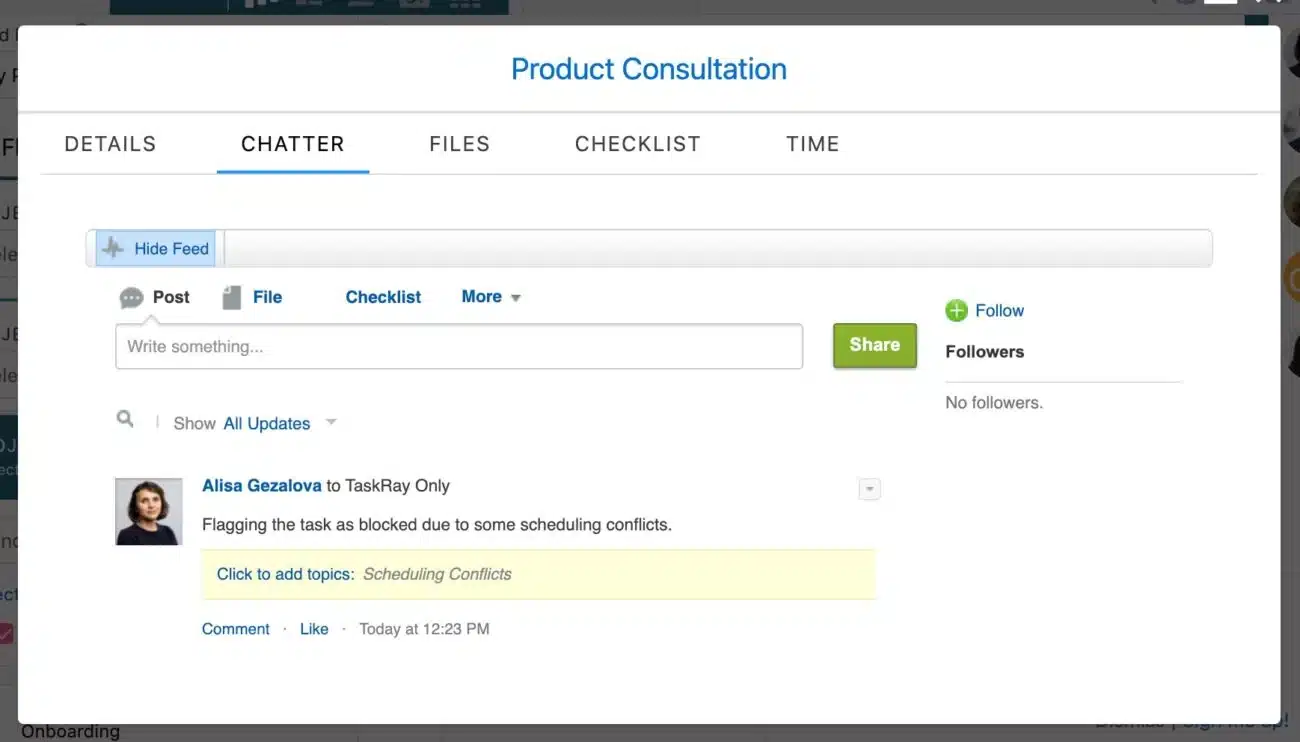
Here is what changes when the MAP lives in Salesforce:
Run your MAP through this checklist before kickoff:
See how TaskRay can help your team deliver customer projects more efficiently. Request a demo today.
A SaaS onboarding MAP includes every task from kickoff to go-live with a named owner (vendor or customer), a calendar due date, a status, and any dependencies or risks. It also includes milestone dates for kickoff, discovery complete, configuration freeze, UAT start, go-live, and stabilization end.
The vendor’s implementation manager typically owns the MAP structure and keeps it current, but every task on the plan has its own named owner. The implementation manager also runs day-to-day execution and timeline management, and is the first escalation point when a task slips.
Detailed enough that every task has a named owner, a date, and a clear definition of done, but not so detailed that the plan becomes unmanageable. Task count depends on scope rather than a fixed target. A mid-market SaaS implementation typically spans eight to twelve weeks, and the plan grows with each integration, data migration, or compliance requirement you add. Enterprise multi-workstream plans run larger because each workstream carries its own tasks, owners, and dependencies. Set the level of detail from the scope agreed at kickoff.
Create the MAP during the sales-to-delivery handoff, before the kickoff call. The MAP should reflect the commitments in the closed opportunity, the customer’s specific requirements identified during discovery, and the standard onboarding playbook.
A MAP stays current when task status updates flow from the tool where work happens into the plan itself, without manual re-entry. A spreadsheet MAP requires manual updates after every status call, while a Salesforce-native MAP propagates status changes automatically because project records are native Salesforce data.
Mutual action plan: A shared agreement between the vendor and customer that lists every task, owner, date, dependency, and risk from kickoff to go-live.
Go-live date: The calendar date when the customer begins using the system in production. Other dates in the MAP are typically planned backward from this date.
Critical path: The sequence of tasks that determines the earliest possible go-live date. A delay on any critical path task delays go-live by the same amount.
Dependency: A relationship between two tasks where one cannot start until the other completes.
RAID log: A structured tracker for risks, assumptions, issues, and dependencies. In TaskRay, task dependencies already live on the same Salesforce records as the project itself, and risk, assumption, and issue tracking is coming to those records.
Scope creep: The gradual addition of requirements beyond the agreed scope without a corresponding adjustment to timeline, budget, or resources.
Sales-to-delivery handoff: The transition of customer context, commitments, and requirements from sales to delivery after a deal closes. A lossy handoff can cause implementation delays.

