

TL;DR: TaskRay wins for post-sale delivery teams that need customer onboarding and implementation inside the same Salesforce org as revenue data, because its managed package architecture keeps every project record inside the existing security and permission model. Mission Control runs natively on the Force.com platform but targets a broader profile with financial tracking and timesheets, placing it closer to a professional services automation (PSA) tool. 86 Repairs cut client onboarding time by 29% after standardizing onboarding in TaskRay, and Toast improved workload management for its customer onboarding team. The deciding factor is whether the tool was built for post-sale delivery or retrofitted to it. Evaluate against five criteria: platform architecture, resource management, portfolio analytics, onboarding workflows, and total cost of ownership, including Salesforce seat costs and implementation services.
When sales works in Salesforce and delivery works in a separate project management (PM) tool, teams re-enter account details and lose context at the handoff.
A comparison of TaskRay and Mission Control should answer three questions: What does this cost all-in? Which projects are at risk right now? How much can we take on next quarter without hiring? The five criteria below answer them.
Both tools run on Salesforce. The choice hinges on whether the tool was designed for post-sale delivery from day one or adapted to it afterward.
TaskRay is purpose-built for post-sale delivery: onboarding, implementation, deployment, installation, and provisioning. TaskRay’s positioning describes a gap between sales and delivery: sales teams work in Salesforce, but delivery teams often work in a separate tool, so the platform exists to keep post-sale work inside Salesforce. Publicly available listings, such as Software Advice, describe Mission Control with billing, invoicing, time and expense tracking, and budget management, placing it closer to a PSA profile.
For an economic buyer, the evaluation framework focuses on five criteria:
| Criteria | What to evaluate | Why it matters for the board |
|---|---|---|
| Architecture | Managed package vs. custom objects | Security model inheritance, no sync failures |
| Resource Management | Capacity planning, workload balancing, skills-based assignment | Can you take on new business without emergency hiring? |
| Portfolio Analytics | Native Salesforce Reports vs. proprietary dashboards | Real-time delivery health without manual assembly |
| Onboarding Workflows | Auto-launch from closed-won, template standardization | Time-to-value and consistency across customers |
| Total Cost of Ownership | License + Salesforce seats + implementation + admin overhead | Honest all-in cost for internal justification |
| Capability | TaskRay | Mission Control |
|---|---|---|
| Project Health | Risks, Assumptions, Issues, and Dependencies (RAID) log, red/amber/green status, packaged flows | Risk management, issue logs, project management office (PMO) analysis |
| Capacity Planning | Resource Planner, Resource Analytics, Resource Forecasting from pipeline | Resource capacity planning, Resource Schedulers |
| RAID Tracking | Risks, assumptions, issues, dependencies tracked in-project | Separate Risk Log and Issue Log features documented, risk and issue logs tracked separately, with no combined RAID view explicitly documented |
| Auto-launch from Closed-Won | TaskRay Create Project from Opportunity, TaskRay Convert Forecast Project on Opportunity Close | Auto-generation available via ‘Generate Project’ field and Workflow Rules |
| Artificial Intelligence (AI) Capabilities | TaskRay Agents, Model Context Protocol (MCP) connectivity for Claude, ChatGPT, Microsoft Teams, and Gemini | Not explicitly documented |
Project templates are TaskRay’s scaling mechanism. A template encodes the onboarding steps once, so the tenth implementation runs the same sequence as the first. When a deal closes in Salesforce, TaskRay can auto-launch a project using the data already in the opportunity record, so no one copies account details into a separate tool.
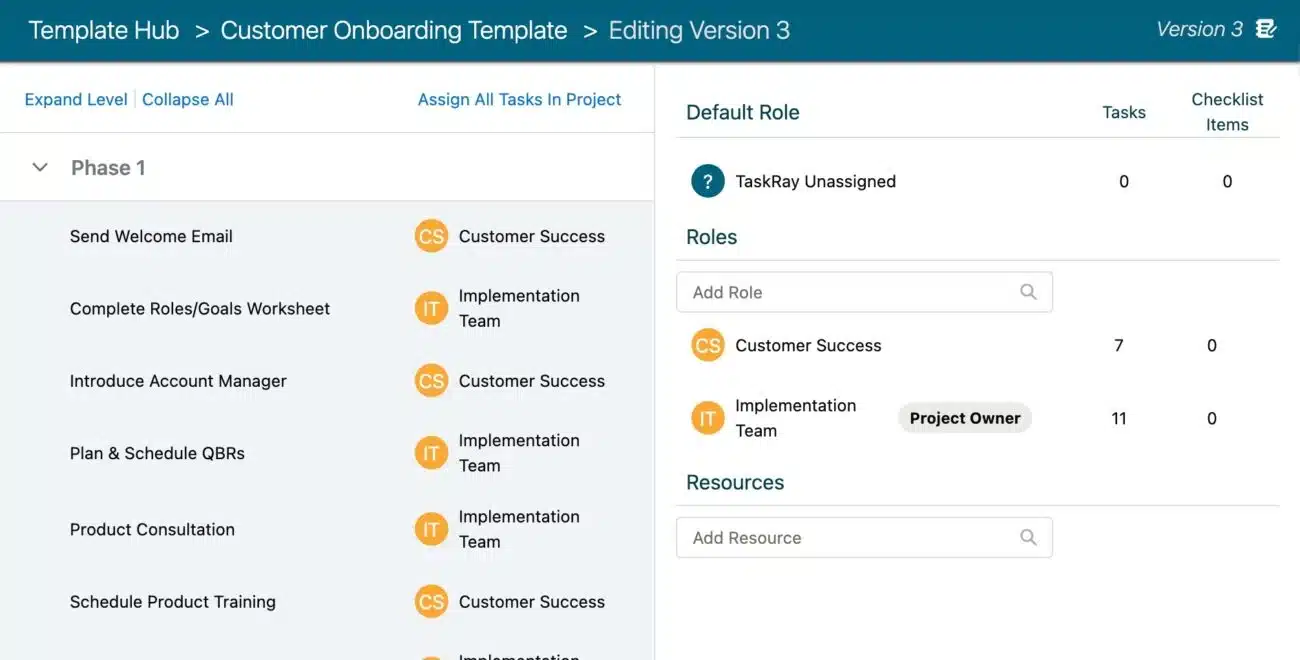
86 Repairs cut client onboarding time by 29% after standardizing onboarding workflows in TaskRay. 86 Repairs’ case study shows an average reduction of 19 days, and the team reduced per-location onboarding costs by 21%. Because the process is encoded in a template, not remembered, each added account reuses the same plan instead of a rebuilt one.
Publicly available listings describe Mission Control’s platform strategy as including billing, invoicing, time and expense tracking, and budget management, aligning with a PSA use case. TaskRay is not built for ad hoc internal project work or full PSA with billing and time-and-expense management.
If your primary need is repeatable customer onboarding and implementation, TaskRay’s narrower focus is an advantage. If your primary need is billing and invoicing inside Salesforce, Mission Control’s broader scope may be relevant. For post-sale delivery where the sale triggers the work, TaskRay’s focus matches the tool to that motion.
| Criteria | TaskRay | Mission Control |
|---|---|---|
| Architecture | Managed package, all records are Salesforce objects | Native application on Force.com, custom objects installed |
| Resource Management | Dynamic Team Builder, Roles, Attributes, Resource Planner, Resource Analytics, Resource Forecasting | Resource Schedulers, resource capacity planning, Role Utilization Report |
| Portfolio Analytics | Standard Salesforce Reports and Dashboards, Portfolio View | PMO Dashboard, reports and dashboards |
| Onboarding Workflows | Packaged flows: Create Project from Opportunity, Customer Onboarding Kickoff, Convert Forecast Project on Opportunity Close | Auto-generation from Opportunity via Workflow Rules, Project Cloning |
| AI Capabilities | TaskRay Agents, MCP for Claude, ChatGPT, Microsoft Teams, and Gemini | Not explicitly documented |
Disconnected tools create risk. The customer relationship management (CRM) system reflects what was true at close, actual delivery progress lives somewhere else, and late-running onboarding projects can surface through customer escalations, not internal systems.
86 Repairs shows what this split looks like in practice. Before TaskRay, its onboarding work ran across a separate tool, a spreadsheet, and Salesforce, so each new location meant reconciling three sources of status. After moving onboarding into TaskRay, 86 Repairs cut onboarding time by 29%.
Native architecture removes the integration maintenance burden and reduces data integrity risk. When the delivery tool is a Salesforce managed package, project records are Salesforce records. They inherit the permission sets, field-level security, and sharing rules already configured in your org. There is no parallel permission model to build or maintain.
At closed-won, TaskRay projects launch with the opportunity’s data already attached. TaskRay’s packaged flows include TaskRay Create Project from Opportunity and TaskRay Customer Onboarding Kickoff Flow, which auto-launch projects and carry customer data from Sales Cloud into delivery without manual re-entry.
86 Repairs reduced client onboarding time by 29% and reduced per-location onboarding costs by 21% after adopting TaskRay. The workflow change behind the number was standardizing onboarding workflows through templates and launching projects automatically when sales closed a deal.
Mission Control runs natively on the Force.com platform and installs custom Salesforce objects to store project management details, so project data lives inside your Salesforce org. The distinction is scope: Mission Control’s data model is built for a broader use case that includes financial tracking, while TaskRay’s data model is built specifically for post-sale delivery workflows.
Every integration between the CRM and the project management tool requires someone to maintain it, and when it breaks, data goes stale without anyone noticing. IT and operations spend recurring cycles troubleshooting sync failures rather than building new capabilities.
TaskRay is a managed package, not an integration. TaskRay project records inherit your org’s field-level security and sharing rules, so you maintain no parallel security model. There is no extract, transform, load (ETL) pipeline or sync job to keep running. Loading existing data or moving templates between environments is a one-time task done with tools like Data Loader.
Capacity planning that relies on informal headcount estimates rather than forward-looking utilization data stays reactive. Staffing decisions made that way can come too late to avoid either overextending existing staff or missing a growth opportunity.
TaskRay’s resource management capabilities vary by edition. Confirm which features are included in Standard vs. Premium directly with TaskRay sales before budgeting.

TaskRay templates standardize repeatable processes and automate administrative project work, so your teams deliver more without proportional headcount. Toast’s experience shows the mechanism: Toast uses TaskRay to assess each customer (onsite or remote), assign the appropriate team, then generate a TaskRay template. Tasks guide the onboarding team through kick-off calls, site surveys, menu build-outs, point-of-sale (POS) setup, and training. Toast reported that workloads have been easier to manage as a result.
TaskRay’s Dynamic Team Builder and Roles let leaders assign work by skill and capacity, so utilization improves without manual spreadsheet cross-referencing. Utilization moves cost per project. When utilization improves, the same team delivers more projects without adding headcount, which is how delivery margin expands without a proportional cost increase.
Resource Forecasting connects capacity planning to the sales pipeline, so you can see whether your team can absorb new bookings before sales commits to go-live dates. Staffing decisions shift from reactive to forward-looking when capacity data comes from the pipeline.
When dashboards are stale or manually assembled, the data leaders present in a board review can lag behind reality. Portfolio dashboards pull directly from Salesforce records, so the delivery health picture is current without manual assembly.
Because TaskRay project records are Salesforce objects, executives can build portfolio dashboards in standard Salesforce Reports without paying for a separate business intelligence (BI) tool. TaskRay’s reporting documentation confirms that packaged sample reports are built using native Salesforce reporting functionality and can be customized the same way as other Salesforce reports.
TaskRay’s project and portfolio analytics give leaders a live view of project performance, health, timelines, resource allocation, revenue attribution, and delivery trends across the portfolio, and because project records are Salesforce objects, these dashboards update in real time without a manual export. Problems are spotted earlier, and decisions are made with current data. Margin leakage compounds when it’s caught late, so portfolio analytics pull revenue and delivery trends directly from Salesforce project records, and profitability risk surfaces in the same dashboard executives already use for revenue data.
Mission Control provides a PMO Dashboard plus risk management, issue logs, and PMO analysis for project oversight. TaskRay provides portfolio dashboards built in standard Salesforce Reports, which means you build delivery health views using the same reporting tool your executives already use for revenue dashboards, and no separate BI license is required. The distinction is whether Mission Control’s reports are buildable in standard Salesforce Reports or accessed through a proprietary dashboard layer. Mission Control’s project management overview describes tools, reports, and dashboards but does not specify the reporting architecture.
TaskRay Agents automate project status analysis and risk identification, reducing the manual compilation work PMs do before meetings.

Time to value measures the days from signed contract to the customer reaching its first defined milestone. Delayed onboarding risks the renewal conversation and creates escalation pressure, and 86 Repairs’ case study shows how standardization reversed that pattern.
Project templates standardize repeatable onboarding and implementation workflows, so every customer gets a consistent experience. A template is the equivalent of a documented playbook: the tenth implementation runs the same way as the first because the process is encoded, not remembered.
A project template encodes the onboarding steps once. When a new customer closes, the template auto-launches with the correct tasks, milestones, dependencies, and assignments, so a PM doesn’t rebuild the plan, steps are less likely to be forgotten, and customers get the same sequence no matter who runs the kickoff.
Mission Control documents Project Cloning to clone any existing project and use it as a template to initiate a new project. Mission Control also provides auto-generation from Opportunities by setting the ‘Generate Project’ field to true, which can be triggered manually or via Workflow Rules when an Opportunity reaches Closed Won. TaskRay’s packaged flows provide pre-built automation for customer onboarding kickoff and project creation from closed-won opportunities.
Because the handoff from a closed deal needs no copy-paste step, the sales pipeline connects to delivery execution and each project starts with the opportunity’s details already in place. Standardized processes repeat at higher volume because each new customer project launches from the same encoded template rather than a rebuilt plan.
Faster time to first milestone reduces churn risk, because customers who reach their first defined milestone on schedule are more likely to renew, and early delivery value sets the tone for the relationship. 86 Repairs cut client onboarding time by 29%, an average of 19 days, after standardizing onboarding workflows in TaskRay. Evaluate your own time from signed contract to first milestone, and calculate how much of that time is spent on manual kickoff setup versus actual delivery work.
Total cost of ownership includes license fees, Salesforce seats, implementation services, and ongoing admin workload, not just the software line item.
TaskRay does not publish pricing. Contact TaskRay sales for a quote on each plan before budgeting.
TaskRay documents TaskRay Agents and MCP connectivity on its product pages, but those pages do not state a price for them. Confirm with TaskRay sales whether AI capabilities are bundled into Standard or Premium or sold as a separate stock keeping unit (SKU) before budgeting.
Mission Control’s publicly documented pricing starts at $39/user/month on an annual plan or $49/user/month on a monthly plan, per Software Advice.
| Cost Component | TaskRay | Mission Control (Estimated) |
|---|---|---|
| License (per user/month) | Not published, contact TaskRay sales for a quote | $39-$49 |
| Salesforce Seat (per user/month) | Varies by Salesforce edition, confirm with Salesforce | Varies by Salesforce edition, confirm with Salesforce |
| Implementation | TaskRay Services, sales-quoted | Not explicitly documented |
| Ongoing Admin | Existing Salesforce admin | Existing Salesforce admin |
| AI Capabilities | Documented (TaskRay Agents, MCP), price not published on product pages | Not explicitly documented |
Estimated Monthly Software as a Service (SaaS) Spend: TaskRay does not publish pricing, so request a quote from TaskRay sales. Mission Control $39-$49/user/month, based on the Software Advice listing, which is not a vendor quote.
Because TaskRay is a managed package, not an integration, there is no ETL pipeline or sync job to maintain. Moving existing data or templates into TaskRay is a one-time load with tools like Data Loader, not a recurring workload. Native architecture removes the recurring maintenance overhead of integrated architectures, which reduces the ongoing admin cost component of total cost of ownership (TCO).
Implementation, onboarding, and ongoing management matter more than the license line. TaskRay is not the right fit for every team. If budget is the primary constraint and a lower-priced tool is acceptable, TaskRay may not be the answer. If you are not on Salesforce, TaskRay is not the answer. But if you are on Salesforce and your delivery motion is repeatable post-sale onboarding, the TCO comparison should include the cost of maintaining an integration, which does not apply to a managed package because there is no integration to maintain.
For an economic buyer, the two criteria that move the decision beyond feature comparison are whether the sales-to-delivery handoff stays inside Salesforce and whether onboarding volume can grow without proportional headcount. Beyond the five evaluation criteria above, two strategic criteria matter: handoffs within Salesforce, and onboarding at scale without new hires.
TaskRay supports triggering project kickoffs directly from closed-won opportunities and carrying customer information from Sales Cloud into delivery. Sales and delivery operate from the same record, which reduces the gap that causes late discovery of at-risk projects.
Project templates standardize repeatable onboarding and implementation workflows, so higher customer volumes can be delivered without proportional headcount growth.
86 Repairs lowered per-location onboarding cost by 21% after moving onboarding out of a separate tool, a spreadsheet, and Salesforce and into TaskRay. The workflow change was auto-creating projects when a deal closes and standardizing onboarding through templates, so each new location launches from the same plan without anyone re-entering account details. The case study reports cost per location, not accounts per specialist, so read it as evidence that each added location costs less to onboard, not as a headcount figure.
Named customer outcomes with operational context are the most useful proof for an economic buyer, so compare each one to your own company size, industry, and delivery motion before you rely on it.
Toast improved workload management and team capacity for their customer onboarding team. The workflow change was template-driven onboarding, which allowed Toast to scale customer onboarding.
86 Repairs cut onboarding time by 29%, reached a 19-day average onboarding time, and brought launches three weeks sooner. It also lowered per-location onboarding cost by 21%. Before TaskRay, onboarding ran across a separate tool, a spreadsheet, and Salesforce. The workflow change was auto-creating projects when a deal closes and standardizing onboarding through templates, so no one rebuilds the plan or re-enters account details for each new location. Compare this before state to your own handoff to see how many systems a single onboarding touches today.
The selection should hinge on the delivery motion, not the Salesforce-native label alone. Repeatable customer onboarding and post-sale implementation favors TaskRay. Full PSA requirements like billing and time-and-expense management sit outside TaskRay’s scope.
Project templates, automation, resource management, portfolio analytics, and AI agents are the levers that move per-project delivery cost as volume scales. Measure the outcome in delivery margin, utilization rates, and onboarding speed, not feature counts.
Mission Control provides program management, PMO analysis, and portfolio dashboards for organizations that need PSA-level portfolio management with financial tracking. For post-sale delivery portfolios where the focus is onboarding speed, resource utilization, and delivery health, TaskRay’s narrower focus matches the work without PSA billing and time-and-expense features.
Before signing a contract, verify these capabilities in a demo or sandbox:
See how TaskRay can help your team deliver customer projects more efficiently. Request a demo today.
TaskRay is better for post-sale delivery teams that need customer onboarding and implementation inside the same Salesforce org as revenue data. Mission Control targets a broader project management profile that includes financial tracking and timesheets, which puts it closer to a PSA.
TaskRay does not publish pricing, so request a quote from TaskRay sales. Mission Control estimates range from $39-$49/user/month, per Software Advice. Both require Salesforce seats, which vary by Salesforce edition, so confirm current seat pricing with Salesforce. Depending on the edition, the Salesforce seat cost can exceed the PM tool license cost.
Both can handle onboarding, but TaskRay provides packaged flows that auto-launch from closed-won opportunities, while Mission Control provides auto-generation via Workflow Rules and manual Project Cloning as template mechanisms.
TaskRay is a managed package, so setup requires no ETL pipeline and no ongoing sync to maintain. Loading existing data from an external system or moving templates across environments is a one-time task using tools like Data Loader. Mission Control installs custom objects in your Salesforce org, which also requires no external integration. Neither vendor publishes a standard implementation timeline in the sources reviewed, so confirm timelines and service costs with each vendor.
No. Both are Salesforce-native and do not require separate integrations. TaskRay is a managed package. Mission Control is a native application on the Force.com platform.
Salesforce-native project management: A project management tool built entirely inside the Salesforce platform, where project records are Salesforce objects subject to the org’s security model.
Managed package: A Salesforce application installed directly into your org, inheriting all existing permissions, sharing rules, and field-level security without a separate integration layer.
Sales-to-delivery handoff: The process of transferring customer information, commitments, and context from the sales team to the delivery team after a deal closes.
Time to value: The time from signed contract to the customer reaching its first defined milestone, such as go-live or adoption.
Resource utilization: The percentage of a team member’s available time that is assigned to billable or delivery work.
RAID log: A project management tracking mechanism for risks, assumptions, issues, and dependencies.
Portfolio dashboard: A cross-project view that shows delivery health, timelines, and resource allocation across multiple concurrent projects.
Total cost of ownership: The all-in cost of a Salesforce-native PM tool, including license fees, Salesforce user seats, implementation services, and ongoing Salesforce admin workload.

