

TL;DR: TaskRay is the stronger choice for delivery teams that need pipeline-based resource forecasting, portfolio dashboards, and a sales-to-delivery handoff inside Salesforce, while Inspire Planner fits teams whose main need is visual Gantt scheduling. Both run natively in Salesforce and can create a project when an opportunity closes. The difference is depth: TaskRay connects templates, RAID logs, and capacity data to your opportunity and account records. FieldEdge by Xplor cut time-to-go-live by 40 to 50 days after standardizing onboarding workflows in TaskRay. Inspire Planner publishes pricing from $24 per user monthly (Core plan) with a 10-license minimum, while TaskRay does not publish pricing and provides quotes on request. Before shortlisting, count the weekly hours your team spends reconciling project status, and check whether your tool shows staffing demand from the pipeline.
When evaluating TaskRay vs. Inspire Planner, the decision hinges on whether you need a scheduling interface or a delivery system of record that removes the weekly work of reconciling project status with Salesforce. Choosing a Salesforce project management (PM) tool on license price alone leaves the cost of manual reporting hours out of the comparison.
If you own delivery margin, three criteria decide the shortlist:
TaskRay and Inspire Planner differ sharply in how they deliver against these requirements. This Salesforce project management comparison evaluates both platforms against the operational metrics that determine delivery margin, not feature checklists.
TaskRay operates as a managed package inside your Salesforce org, meaning project templates, risks, assumptions, issues, and dependencies (RAID) logs, and resource forecasts live alongside opportunity and account data. The platform supports auto-launch from closed-won opportunities, eliminating the manual handoff where delivery teams copy account details into a separate system.
TaskRay maintains a 4.3/5 rating across 162 G2 reviews (checked November 2026). The learning curve is real for users new to Salesforce, and total cost of ownership includes Salesforce seat licenses that can surprise buyers who evaluate software costs in isolation. TaskRay ranks #1 of 348 project management apps on the Salesforce AppExchange, where its listing shows a 4.95 rating across 330 reviews (checked November 2026).
Inspire Planner positions itself as a complete and native project management app for Salesforce, emphasizing interactive Gantt charts where users define predecessors, set milestones, and identify the critical path within a drag-and-drop interface. The platform offers resource allocation views showing capacity and availability based on assigned tasks.
Published pricing starts at $24 per user monthly for the Core plan (Pro is $35), billed annually, with a 10-license minimum and a required onboarding package (checked November 2026). Inspire Planner’s analytics are built on standard Salesforce reports and dashboards. When evaluating Inspire Planner vs. TaskRay, the former suits small teams with simple onboarding workflows, while TaskRay scales to enterprise delivery operations requiring pipeline-to-capacity forecasting.
Selecting between Salesforce native PM tools requires benchmarking against the operational metrics that protect delivery margin. The following criteria separate scheduling utilities from operational systems of record.
| Capability | TaskRay Approach | Inspire Planner Approach | Economic Impact |
|---|---|---|---|
| Data Model | Managed package, native Salesforce objects | Native Salesforce application | Both: no external sync to fail |
| Portfolio Analytics | Native Salesforce Reports and Dashboards | Salesforce reports and dashboards | TaskRay: cross-project dashboards without a separate BI tool |
| Sales Handoff | Auto-launch from closed-won opportunity | Flow-based auto-creation from Closed Won opportunities, using project templates | Both: no manual re-entry at kickoff |
Delivery leaders need to model capacity against incoming opportunities before sales commits to go-live dates. A forward-looking view lets you plan staffing ahead of demand instead of relying on informal estimates and reactive hiring.

Inspire Planner offers resource planning with three key capabilities:
The difference becomes material as the number of concurrent implementations grows and your delivery team must answer “how much can we take on next quarter without hiring” before sales closes the quarter.
TaskRay templates encode repeatable onboarding workflows so the tenth implementation runs the same sequence as the first. FieldEdge by Xplor cut time-to-go-live by 40 to 50 days after standardizing these workflows in TaskRay.
Inspire Planner supports project templates and Salesforce Flow automation for task creation. TaskRay templates standardize repeatable onboarding workflows, while its Gantt and critical-path views handle dependencies for complex, multi-stakeholder deployments. The TaskRay Academy template walkthrough demonstrates how templates standardize new project creation.
Portfolio dashboards in TaskRay pull directly from Salesforce records, showing project health, revenue attribution, and delivery trends without manual assembly. This eliminates the manual data reconciliation that consumes executive time before leadership reviews.
Toast’s onboarding team struggled with unstructured workloads, and after adopting TaskRay’s Plan View, My Work, and resource planning, workloads became easier to manage and the team onboarded more customers in a more structured way. Inspire Planner provides project-level Gantt views and time tracking, with reporting built in standard Salesforce reports and dashboards.
Both platforms operate as Salesforce-native applications, so project records inherit the org’s field-level security and sharing rules. This matters for regulated industries where data residency inside the customer relationship management (CRM) system is non-negotiable.
Inspire Planner also runs natively in Salesforce, providing the same architectural foundation that eliminates sync failures common to standalone tools. TaskRay’s project, resource, and RAID records sit alongside opportunity and account data, so executives can build delivery dashboards in standard Salesforce Reports without paying for separate business intelligence (BI) tools. Running natively in Salesforce means your project data benefits from the same backup, security, and compliance controls as your CRM data, as TaskRay’s guide for Salesforce users explains.
Delivery predictability requires a live view of risks before they become escalations. TaskRay approaches this through structured risk management and direct revenue linkage.
TaskRay surfaces at-risk projects through status indicators tied to actual milestone completion, not subjective PM updates. TaskRay’s Portfolio View video walkthrough demonstrates how executives see project health and approaching go-live dates in a live dashboard before the weekly review, not during it.
This real-time monitoring eliminates the lag between when a problem occurs and when leadership can act. The dashboard pulls directly from Salesforce records, so the delivery health picture remains current without manual assembly or the staleness that plagues weekly spreadsheet updates.
When a deal closes in Salesforce, TaskRay auto-launches the project using data already in the opportunity record, so no one copies account details into a separate tool. This continuity prevents the governance failures that compound silently across handoffs.
TaskRay’s RAID tracking captures risks, assumptions, issues, and dependencies as they emerge during delivery, creating an audit trail that distinguishes a recoverable delay from a failing implementation. This early warning system gives the delivery team a logged record of each risk before it reaches the customer as an escalation.
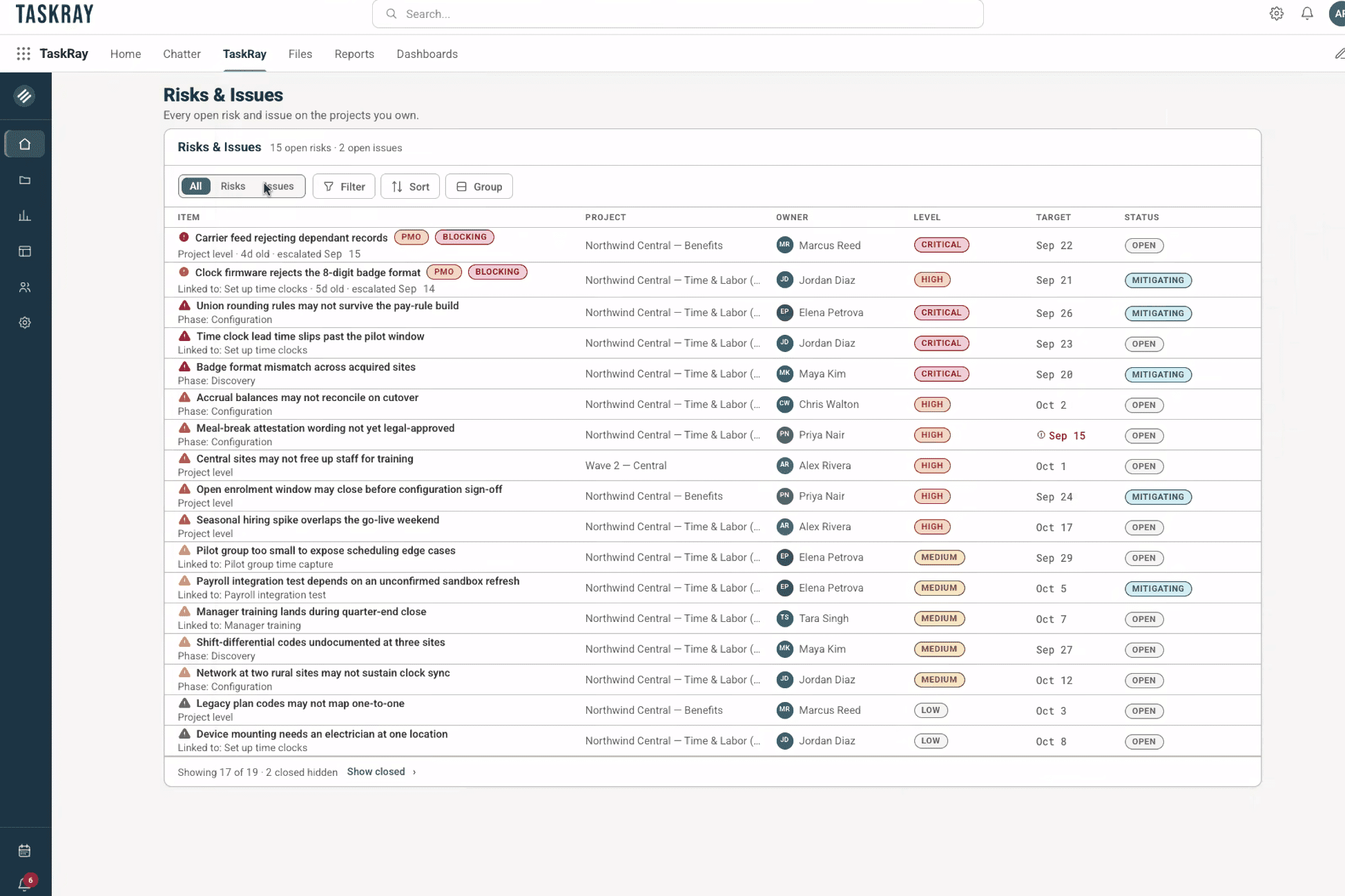
The RAID log lives alongside the project record, ensuring that post-mortems surface structural fixes rather than repeated root causes. When a project slips, the RAID history shows whether the risk was logged early or surfaced late, providing the governance data that improves future delivery predictability.
Revenue attribution in TaskRay connects project performance to financial outcomes, showing the revenue impact of delayed go-lives. This single view of delivery and revenue data shows leaders where project work is driving growth and where it is adding cost.
Executives can track delivery trends against revenue targets in the same Salesforce org, eliminating the conflicting account status that emerges when sales and delivery operate from different systems. The TaskRay product overview details how this revenue linkage works across the customer lifecycle, from closed-won through renewal.
Inspire Planner earns consideration for specific use cases where visual scheduling aligns with team maturity.
Inspire Planner’s interactive Gantt chart provides an intuitive interface for teams transitioning from Microsoft Project or Smartsheet, offering drag-and-drop scheduling with multiple predecessors and baseline comparisons. This visual approach reduces the learning curve for project managers unfamiliar with Salesforce objects.
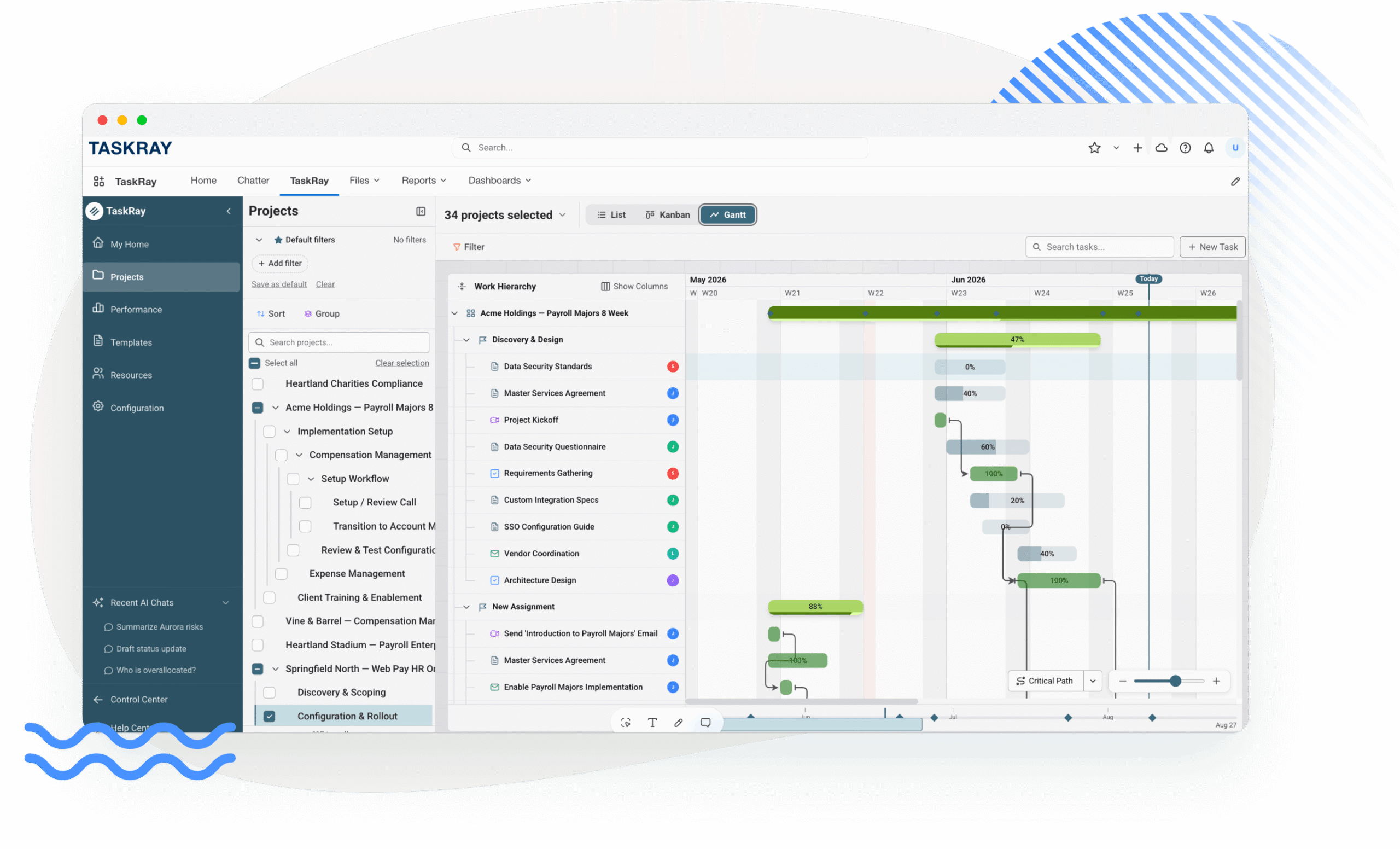
TaskRay also provides Gantt and critical path functionality, layering it with portfolio analytics that show resource constraints across all active projects, not just individual timelines. For teams whose primary constraint is visual scheduling simplicity, Inspire Planner’s focused interface serves that need. For teams that need to connect those schedules to capacity and revenue data, TaskRay’s integrated approach delivers the operational control that prevents margin leakage.
For small teams with straightforward onboarding workflows, Inspire Planner’s Flow automation and template library offer sufficient structure without the complexity of enterprise-scale resource management. The platform supports sharing project plans with external contacts and creating standardized task sequences.
TaskRay matches this automation capability while adding the capacity forecasting that becomes critical as onboarding volume grows. The choice depends on whether your current constraint is task organization or delivery scale.
Inspire Planner includes time tracking and expense monitoring within project records, providing a basic view of costs for services organizations. While this suffices for simple time-and-materials tracking, TaskRay’s resource management extends to capacity analytics and utilization forecasting that connect delivery costs to pipeline revenue, giving economic buyers the margin data they require for scaling operations.
Total cost of ownership extends beyond the per-user license fee. The following comparison reflects November 2026 market data.
| Cost Component | TaskRay | Inspire Planner | Notes |
|---|---|---|---|
| Entry Price | Not published; quote-based | From $24/user/month (Core), $35 (Pro), billed annually, 10-license minimum (published) | TaskRay pricing varies by team size, contract term, and edition |
| Implementation | Services required, varies by scope | Onboarding package mandatory | Budget user training time for either tool |
| Salesforce Licenses | Required on top of TaskRay fees | Required on top of Inspire Planner fees | Salesforce licenses are required at list price and vary by edition. |
| Contract Value | Quote-based | Not disclosed | Request a quote that reflects your team size, edition, and implementation scope. |
TaskRay offers three tiers: Starter, Standard, and Premium. TaskRay does not publish pricing, and actual cost varies by team size, contract term, and edition.
Because TaskRay pricing is not published, you cannot estimate cost by multiplying a list price by seats. Request a consultation with TaskRay to understand pricing for your needs, based on your team size, contract term, edition, and implementation scope.
Inspire Planner’s published price starts at $24 per user monthly for the Core plan (Pro is $35), billed annually, with a 10-license minimum and a required onboarding package (checked November 2026). For a 10-user team on Core, first-year software costs start at approximately $2,880 plus onboarding.
This transparent pricing simplifies budgeting for small teams but scales with every seat you add. Calculate return on investment (ROI) by multiplying the weekly hours saved on manual Gantt chart updates by your project manager’s loaded hourly cost, then compare the annual result with first-year license and onboarding cost. Factor in the reconciliation hours your operations team currently spends weekly assembling delivery status from disconnected systems.
Implementation timelines for Salesforce-native PM tools vary with workflow complexity and data migration requirements. Inspire Planner’s standard onboarding runs approximately 6 to 8 weeks per its published onboarding services page, while G2 lists TaskRay’s time to implement as 2 months (onboarding page checked November 2026, and G2 checked November 2026). TaskRay Services provides implementation and configuration support, while Inspire Planner requires a mandatory onboarding package.
Factor in the change management cost: TaskRay’s interface presents a steeper learning curve for users new to Salesforce, while Inspire Planner’s Gantt-first design may reduce initial training time for scheduling-focused teams. The TaskRay Services overview describes the implementation methodology TaskRay uses for enterprise deployments.
The hidden cost in any PM tool is the administrative time spent maintaining data integrity between systems. TaskRay eliminates the manual reporting tax by keeping project data in Salesforce, so operations managers stop reconciling status across systems each week.
Inspire Planner also keeps project data in Salesforce, so the difference comes down to how much portfolio reporting you need to build yourself. Calculate your current weekly reconciliation hours and multiply by loaded hourly cost to determine the ROI of keeping delivery data in one Salesforce org.
The decision between TaskRay and Inspire Planner represents a broader architectural choice about where delivery data lives.
TaskRay’s managed package architecture means every project, task, and milestone exists as a Salesforce record, inheriting permission sets and sharing rules. This native approach ensures that field-level security configured for account executives applies equally to project managers viewing customer onboarding status.
Inspire Planner also operates natively, and both avoid the application programming interface (API) synchronization that external tools need for portfolio reporting. The TaskRay support documentation details how project privacy and sharing rules integrate with Salesforce’s security model.
When delivery runs in a separate system, the integration layer becomes a failure point. Sync failures create stale data that surfaces during customer escalations, and API maintenance consumes IT resources that could build new capabilities. TaskRay eliminates this maintenance overhead by residing entirely within the Salesforce org.
Inspire Planner maintains this native advantage over standalone tools like Asana or monday.com, but teams evaluating Inspire Planner Salesforce integration should verify that capacity forecasting extends beyond allocation views to pipeline-based demand modeling.
Both platforms support Salesforce Flow automation, but TaskRay’s architecture connects opportunities, projects, and resource assignments in one automation chain. A closed-won deal launches a project with customer data already populated, so delivery starts without re-entry or a handoff delay between sales and delivery.
TaskRay has rolled out Model Context Protocol (MCP) connectivity for AI assistants, and the TaskRay Trust Center lists a System and Organization Controls (SOC) 2 report, with additional compliance documentation available on request. The TaskRay Trust Center provides current compliance documentation for security-conscious buyers.
The final selection depends on matching tool capabilities to three operational realities:
If you answered yes to two or more, TaskRay’s architectural approach justifies the implementation investment.
For teams managing complex, repeatable customer onboarding where delays affect revenue recognition, TaskRay provides the template standardization and capacity forecasting needed to scale without proportional headcount growth. The platform’s ability to trigger projects from closed-won opportunities ensures that no customer falls through the handoff gap.
Toast’s experience illustrates this outcome:
“With TaskRay, workloads have been easier to manage and our customer onboarding team can manage more customers in a more structured way,” –Toast customer story.
When implementation consistency determines first-year retention, TaskRay’s RAID tracking and project health monitoring provide the early warning system that helps reduce churn. The platform’s portfolio analytics identify which accounts stall and which escalate, separating recoverable delays from failing launches.
Inspire Planner serves teams with simpler implementation workflows where Gantt scheduling suffices, but growing organizations eventually require the capacity analytics that predict when the delivery org becomes the bottleneck to growth. The TaskRay resource management capabilities address this scaling constraint directly.
For internal IT projects or ad hoc operational workflows, Inspire Planner’s lighter-weight approach may reduce unnecessary complexity, because TaskRay is built for repeatable, customer-facing delivery triggered by a sale or contract. Where internal work draws on the same Salesforce-licensed people as customer projects, TaskRay’s resource management shows that demand next to customer delivery in one capacity view.
Economic buyers should evaluate whether the organization needs a single system of record for all project types or a specialized tool for customer-facing delivery. The TaskRay customer onboarding solution overview demonstrates how the platform handles the full post-sale delivery lifecycle.
For delivery teams managing many concurrent customer implementations where margin leakage, capacity constraints, or manual reporting consume executive time weekly, TaskRay provides the operational system of record that Inspire Planner’s scheduling focus cannot match. See how TaskRay can help your team deliver customer projects more efficiently. Request a demo today.
TaskRay is built for Salesforce-native teams that run portfolio analytics in Salesforce Reports and Dashboards, log RAID items alongside the project record, and forecast resources against the sales pipeline. Inspire Planner suits smaller teams that prioritize visual Gantt scheduling and want a published entry price of $24 per user monthly (Core plan) with a 10-license minimum, while TaskRay does not publish pricing and provides quotes on request.
Yes, both offer resource management, but TaskRay adds Resource Forecasting from the Salesforce pipeline and historical utilization analytics that Inspire Planner’s capacity and allocation views do not match. Inspire Planner provides capacity and allocation views, including PTO, that suit scheduling-focused teams.
Both tools can create a project automatically from a closed-won opportunity, so the handoff to kickoff depends mostly on how your templates are set up. On published figures alone, Inspire Planner implements faster: its onboarding services page cites approximately 6 to 8 weeks, while G2 lists TaskRay’s time to implement as 2 months. Your actual timeline depends on workflow complexity.
Both platforms require Salesforce licenses for internal users. TaskRay offers a customer collaboration portal for external stakeholders without additional Salesforce licenses, while Inspire Planner allows sharing project plans with external contacts.
TaskRay provides a stronger portfolio-level view through native Salesforce dashboards that show project health, resource allocation, and revenue attribution across the entire delivery portfolio without manual data assembly.
Salesforce-native project management: Project management software built as a managed package inside the Salesforce platform, where project data exists as Salesforce records inheriting the org’s security model and automation rules.
Portfolio reporting: Cross-project analytics that aggregate delivery health, resource utilization, and milestone completion rates across multiple concurrent implementations, typically displayed in executive dashboards.
Resource capacity planning: The process of forecasting team availability and skills against incoming project demand, measured in hours or full-time equivalent (FTE) over a forward-looking window.
RAID tracking: A risk management framework capturing Risks, Assumptions, Issues, and Dependencies during project delivery to identify potential delays or failures before they impact the go-live date.
Total cost of ownership (TCO): The complete financial commitment for software, including license fees, implementation services, Salesforce seat costs, training, and ongoing administrative maintenance, not just the per-user subscription price.

