

TL;DR: A mutual action plan for customer onboarding is a shared, customer-facing plan that names what you and the customer will each do, by when, from kickoff through go-live and stabilization, with an owner and date beside every step. You launch it from the customer relationship management (CRM) record, track dependencies and risk in one place, and hand off to customer success with a defined data package. FieldEdge by Xplor cut time-to-go-live by 40 to 50 days after standardizing onboarding workflows in TaskRay. Evaluate your current kickoff: if the plan is a static document rebuilt and re-entered for each account, fix that first.
A delayed go-live erodes customer confidence before the renewal conversation starts. Rebuilding the onboarding plan for each account and re-entering deal data by hand consumes the hours the actual work needs, and status calls consume more.
Another document does not solve this, but a customer onboarding mutual action plan works when it operates as the spine of your delivery motion: a living system of record both sides maintain, with named owners, tracked dependencies, and a defined handoff to customer success. This framework covers building that plan, with milestone examples, tactics for keeping both sides on the same data, and template components.
A mutual action plan (MAP) names what each party will do, by when, to reach go-live, with an owner and date beside each step. If you wrote the plan alone and are the only person updating it, that is a checklist with an audience, not a MAP.
A MAP can improve your onboarding outcomes because it creates shared accountability and puts risk in front of both sides earlier than an internal plan does. When the customer co-owns milestones and sign-offs, stalls become visible to both sides at the same time.
The distinction shows up in five dimensions: audience, ownership, visibility, change process, and success metric. An internal project plan records what your team believes will happen. A mutual action plan records what both sides agreed will happen as ORM Tech frames the difference.
| Dimension | Mutual Action Plan | Internal Project Plan |
|---|---|---|
| Audience | Your team and the customer | Internal delivery team only |
| Ownership | Shared. The customer owns meaningful rows | Every owner works at your company |
| Visibility | Customer-visible at all times | Hidden from the customer |
| Change process | Both sides agree to scope and date changes | Your team updates it without customer input |
| Success metric | Both sides meet the agreed success criteria for each milestone | Delivery against your team’s own forecast |
The buyer-side ownership row is the diagnostic. If your team owns every line item, the customer has not committed to anything, and any step with no named owner on their side is a step that will slip. A plan the customer has not committed to is a forecast, not an agreement.
Named owners remove the question of who holds the next step, shared dates answer “where do things stand?” without an email, and tracked dependencies put risk in front of both sides before it reaches escalation.
If you run concurrent implementations, that means one place to check status instead of assembling status decks, and earlier warning before a risk becomes an escalation. When project data sits beside the opportunity record, the delivery team sees the same customer context sales captured without switching tools.
Kickoff is the moment the MAP becomes the shared source of truth. The plan must exist before the kickoff call, populated with account details, products, and commitments already captured in the CRM.
The workflow that makes this possible: when you close a deal in Salesforce, the MAP auto-launches from the opportunity record without re-entry. When you mark an Opportunity Closed Won, a Flow creates a project from the template automatically, capturing the record data. The kickoff starts with the milestone structure and dependencies already in place.

The kickoff call is a working session, not a presentation. It must accomplish four things:
Agree on the success metrics at kickoff, before work starts, and record them in the MAP. Pick the ones that reflect onboarding effectiveness for this customer: go-live date, time-to-value (time from signed contract to the first defined milestone), user acceptance testing (UAT) sign-off date, and customer satisfaction score (CSAT) immediately after onboarding. When a customer requests additional configuration mid-project, you evaluate it against the go-live date both sides committed to, not an open-ended negotiation.
The critical path is the sequence of dependent tasks that directly determines the project’s finish date. If any task on it slips, go-live slips with it. Identify it at kickoff by asking for every task: does this have slack, and does anything downstream depend on it? Tasks with no slack and downstream dependencies belong on the critical path and get the tightest monitoring cadence in weekly reviews.
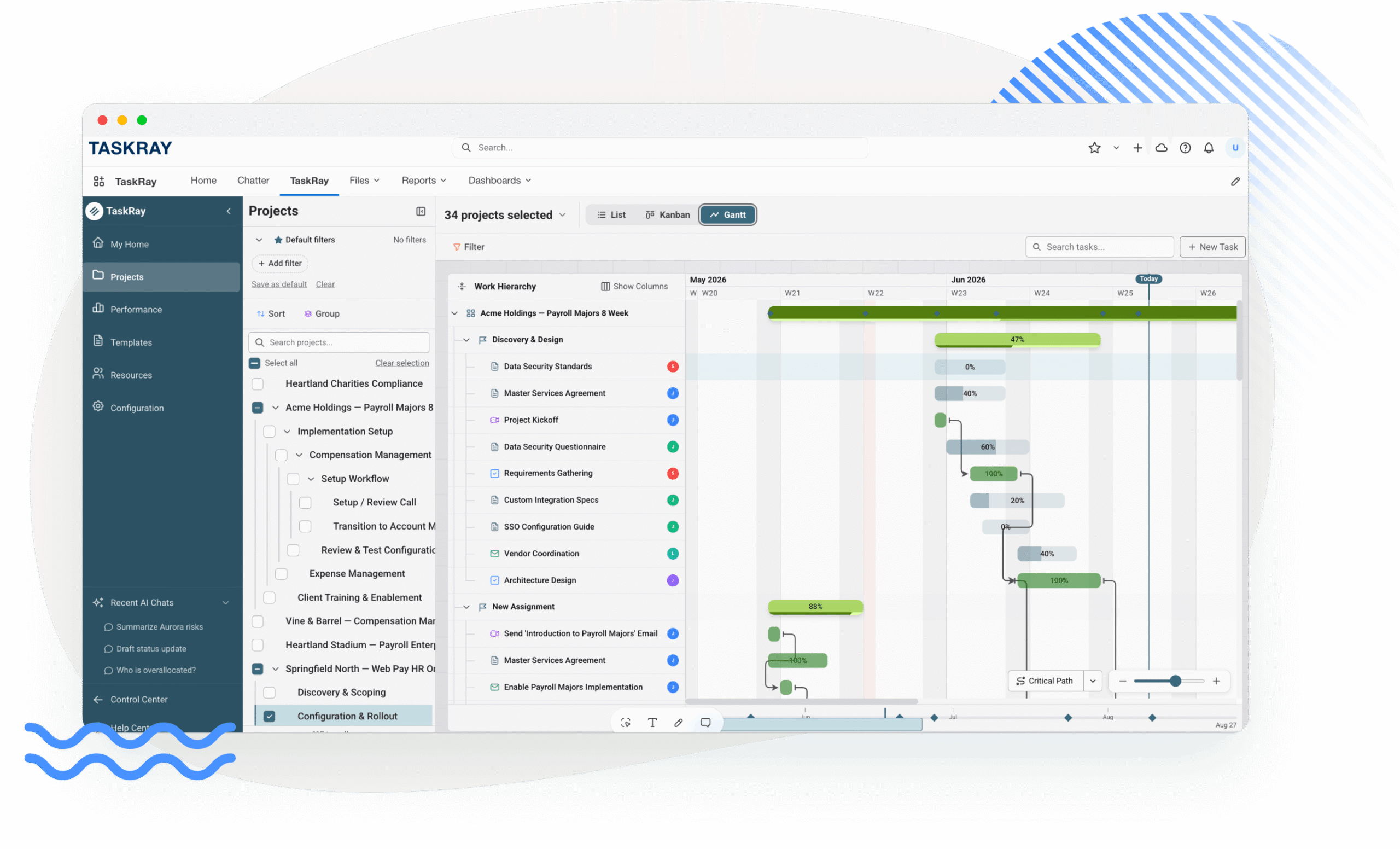
The six steps below are a repeatable way to build a mutual action plan for customer onboarding. Run them the same way for every customer, adjusting milestone details rather than rebuilding the structure.
Treat this as a menu, not a mandate. Pick the milestones that match your delivery motion.
| Milestone | Typical Owner | Timing | Sign-Off Required |
|---|---|---|---|
| Kickoff complete | A named owner on each side | Week 1 | Set in your MAP |
| Discovery and requirements | A named owner on each side | Weeks 1-4 | Set in your MAP |
| Data and access collection | A named owner on each side | Before configuration starts | Set in your MAP |
| Configuration complete | A named owner on each side | Weeks 3-6 | Set in your MAP |
| UAT sign-off | A named customer owner | Weeks 6-8 | Yes |
| Training complete | A named owner on each side | Before go-live, often alongside UAT | Set in your MAP |
| Go-live | A named owner on each side | The date both sides committed to in the MAP | Yes |
| Stabilization exit | A named owner on each side | 4-8 weeks post-live | Set in your MAP |
Capture the customer’s stated business goals at kickoff and map each to the milestone that delivers it. If the customer bought your product to cut order processing time, name the milestone where that capability goes live and the metric that proves it.
Account details, products, and commitments from the opportunity record should populate the MAP automatically at launch. Because TaskRay project records are Salesforce objects, the plan inherits CRM data without a sync or connector, and every project sits next to its account and opportunity, as TaskRay’s Salesforce-native architecture enables.
Define UAT sign-off as a milestone with a named customer owner and date, not an open-ended phase. Standardize the entry criteria and sign-off form so every UAT follows the same sequence. A repeatable milestone with a clear exit is less likely to be the phase where timelines slip quietly.
Go-live is a milestone, not the finish line. Stabilization is a defined period after go-live with its own exit criteria: adoption metrics confirmed, support ticket volume normalized, and open issues resolved or transferred. The stabilization exit triggers the handoff to customer success, so define both the period and exit criteria at kickoff.
Shared view is a maintenance activity, not a one-time kickoff event. The MAP is the shared view, so teams stay aligned when the plan is updated, not when someone sends a status email. Three practices keep the plan honest: a weekly review rhythm, a change control workflow, and an escalation protocol for missed milestones.
A weekly review covers milestone status, blockers, dependency changes, and scope change requests. Share status as pre-reading and use the session for decisions. Open with a clear red, amber, or green status for each milestone, cover what changed, and read back every action item with owner and date. The meeting maintains the MAP, so it never becomes a separate artifact someone updates afterward.
Change control captures, evaluates, and approves or rejects requests to change the approved baseline. In practice: log the request, evaluate impact on the go-live date and critical path, get a decision from both sides, and update the MAP in one place. This surfaces scope creep at the moment of request, not after unplanned work has consumed capacity.
When a milestone slips, it becomes an issue in your RAID log: a known, current problem requiring immediate resolution, with a named owner and response date. Define the escalation path in the MAP itself: who gets notified when a critical path milestone goes red, the response service level agreement (SLA), and how resolution is recorded. RAID tracking in the same system as the project plan keeps the escalation record attached to the work it affects, as TaskRay’s RAID tracking does inside Salesforce.
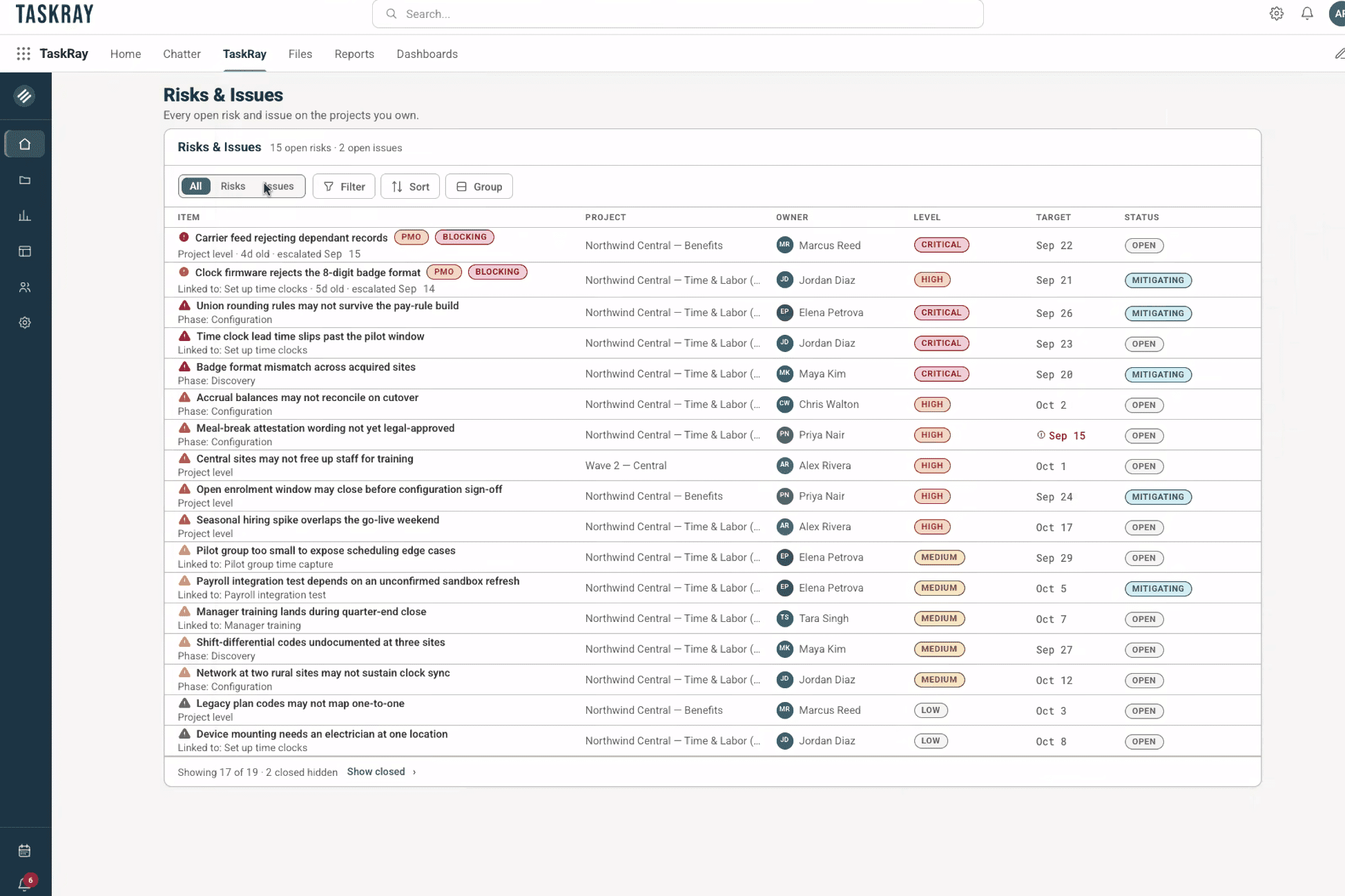
The template is the repeatable asset. Build it once, launch it for every customer, and improve it after each project. A working onboarding mutual action plan template needs a clear goal stated in one or two lines, an owner and due date on every task, and obvious blanks for customer-specific data.
Your template checklist should capture:
TaskRay templates and Stitcher automation support this pattern directly: templates combine into a project and launch automatically when an Opportunity closes, so the tenth implementation runs the same encoded sequence as the first, as TaskRay’s templates overview describes.
Consistent data makes portfolio reporting possible. When every project captures the same fields (go-live date, milestone owners, dependencies, success metrics), leadership sees delivery health across the portfolio without anyone assembling a deck. FieldEdge by Xplor’s experience shows the payoff: before standardizing, their previous tool provided no reporting on time from closed-won to go-live or time per milestone, and implementations ran about 120 days. After standardizing, they cut go-live time to 70 to 80 days from 120 and doubled the accounts each implementation specialist can handle.
Different roles need different views of the same plan. The delivery team sees every task. The customer sees milestones, open items, and sign-offs. Executives see portfolio health. Because TaskRay is a managed package, project records inherit the permission sets, sharing rules, and field-level security already configured in your org, so there is no parallel permission model to build or maintain.
Each role interacts with the MAP at a different altitude. The project manager (PM) manages the plan day to day: updating task status, chasing blockers, running the weekly review. The customer champion signs off on milestones and commits their team’s deliverables. Executive sponsors on both sides review only exceptions: red milestones, change requests, escalation items. Toast’s onboarding team shows what this looks like at scale: after moving to a templated process, workload capacity increased significantly.
The handoff to customer success is a defined milestone with a trigger and data package, not an email thread written during go-live week. A complete handoff record transfers customer goals and promises made during sales, along with pain points, purchased solutions, and key stakeholders, plus completed milestones, success metrics, and communication preferences. When the MAP lives in Salesforce, that record already exists. The CSM inherits the plan rather than a summary of it.
The go-live data package answers the questions the CSM will ask in week one: what did the customer buy, what did we promise, what is done, what is still open, and what does success look like to them. Document products purchased, commitments made during sales, stated goals, milestones completed with dates, open risks from the RAID log, adoption metrics from stabilization, and the exit criteria that triggered handoff. Risks and sensitivities flagged here let customer success handle them early instead of discovering them at the first renewal risk review.
This framework tracks four metrics after go-live: time-to-value, onboarding completion within target, 30/60/90-day satisfaction scores, and the customer’s stated business outcome. These belong in the MAP because they anchor both the handoff and renewal conversations. A CSM who can see the customer reach first value has a different first call than one working from a closed deal record and a calendar invite.
Finalizing the MAP means closing it as a delivery artifact and archiving it as a Salesforce record. The data stays in the org for reporting: which milestone types slip most, how actual timelines compare to the template, which customers hit first value fastest. That record lets you improve the template after each project, so the next onboarding starts from what the last one taught you instead of a blank plan.
See how TaskRay can help your team deliver customer projects more efficiently. Request a demo today.
A mutual action plan is shared with the customer and co-owned: both sides commit to milestones, dates, and sign-offs. A project plan is internal, owned by your delivery team, and forecasts what your team will do without requiring customer commitment.
Share the MAP at kickoff, before delivery work begins. The plan should already exist at that point, launched from the closed opportunity and populated with scope and commitments, so the kickoff call walks the customer through a plan rather than a blank template.
Keep customer-facing milestones at the phase level: discovery, configuration, UAT, training, go-live, and stabilization. Match the number of milestones to the complexity of the implementation, and keep it small enough that both sides can track every one in the weekly review. Task-level detail belongs in the internal project plan underneath each milestone.
The project or onboarding manager owns plan maintenance, but the customer owns their committed rows. Weekly reviews are where both sides update status together, so the MAP stays current as a byproduct of execution rather than a separate reporting task.
Use the same template structure for every customer in the same segment, adjusting milestone details and timing per account. Standardizing the sequence makes delivery repeatable and portfolio reporting possible, while products, dates, and owners flex per customer.
Mutual action plan: A shared, customer-facing plan naming what each party will do, by when, to reach go-live. Both sides own rows and sign off on milestones.
Critical path: The sequence of dependent tasks that directly determines the project’s finish date. A slip anywhere on this path moves the launch date.
Go-live date: The committed date the customer begins using the product in production. It anchors the critical path and every downstream milestone.
UAT sign-off: The milestone where the customer’s business owner confirms the configured solution meets requirements. It gates go-live.
Scope creep: Uncontrolled additions to the agreed work after the plan is set. A change control workflow surfaces it at the moment of request rather than after capacity is consumed.
RAID log: The working record of risks, assumptions, issues, and dependencies for a project. Missed milestones become issues here, with owners and response dates.
Stabilization period: The defined window after go-live with its own exit criteria: adoption confirmed, ticket volume normalized, and open issues resolved or transferred to customer success.

