

TL;DR: An enterprise customer onboarding checklist covers five phases: kickoff, discovery, configuration, user acceptance testing (UAT) and go-live, and post-go-live stabilization. Each phase has a named owner, deliverables, and exit criteria, and a structured pre-kickoff handoff from sales feeds the first one. The checklist works best when you encode it as a project template rather than keep it as a document, with the risks, assumptions, issues, and dependencies (RAID) log in the same system as the project plan and reviewed on a set cadence. FieldEdge by Xplor standardized its onboarding workflows this way in TaskRay and cut time-to-go-live by 40 to 50 days. Before you build, check that every phase has an owner, an exit criterion, and tracking tied to the customer record.
A kickoff template alone won’t protect your go-live date. The handoff that happens before the kickoff matters just as much.
If your checklist lives in a shared drive and your project tool doesn’t sync with the customer relationship management (CRM) system, status has to be reconstructed from separate sources whenever the customer asks where things stand. This guide gives you the master enterprise customer onboarding checklist, a kickoff template, and stage-specific templates that turn a static document into a repeatable workflow.
Many enterprise customer onboarding checklists use a five-phase lifecycle, though there is no universal standard and some organizations split onboarding into six or seven stages. This guide uses five phases. The stages stay the same across customers, and what changes from one customer to the next is the complexity within each phase.
| Phase | Example Deliverable | Example Exit Criterion |
|---|---|---|
| Kickoff and scope agreement | Mutual action plan | Stakeholders agree on scope, timeline, and success criteria |
| Discovery and data collection | Discovery deliverables, such as requirements documentation, a solution architecture draft, a risk assessment, and a delivery roadmap | All technical requirements and access credentials collected |
| Configuration and implementation | Working configuration | Configuration complete and integrations tested |
| UAT and go-live | Customer sign-off | Key business objectives and user requirements validated, critical defects resolved or accepted |
| Post-go-live stabilization (hypercare) | Adoption and issue-tracking summary from the hypercare period | Adoption metrics reviewed, open issues resolved or assigned, and handoff to customer success (CS) confirmed |
Moving from small and medium-sized business (SMB) to enterprise changes not the sequence of phases but the number of stakeholders, dependencies, and regulatory checkpoints within each one. The enterprise onboarding checklist must scale without becoming a different process for every customer, which is why the master checklist needs to be encoded as a project template rather than maintained as a Word document edited per account. TaskRay’s customer onboarding resources cover how teams set this up.
The non-negotiable elements of any customer onboarding process checklist:
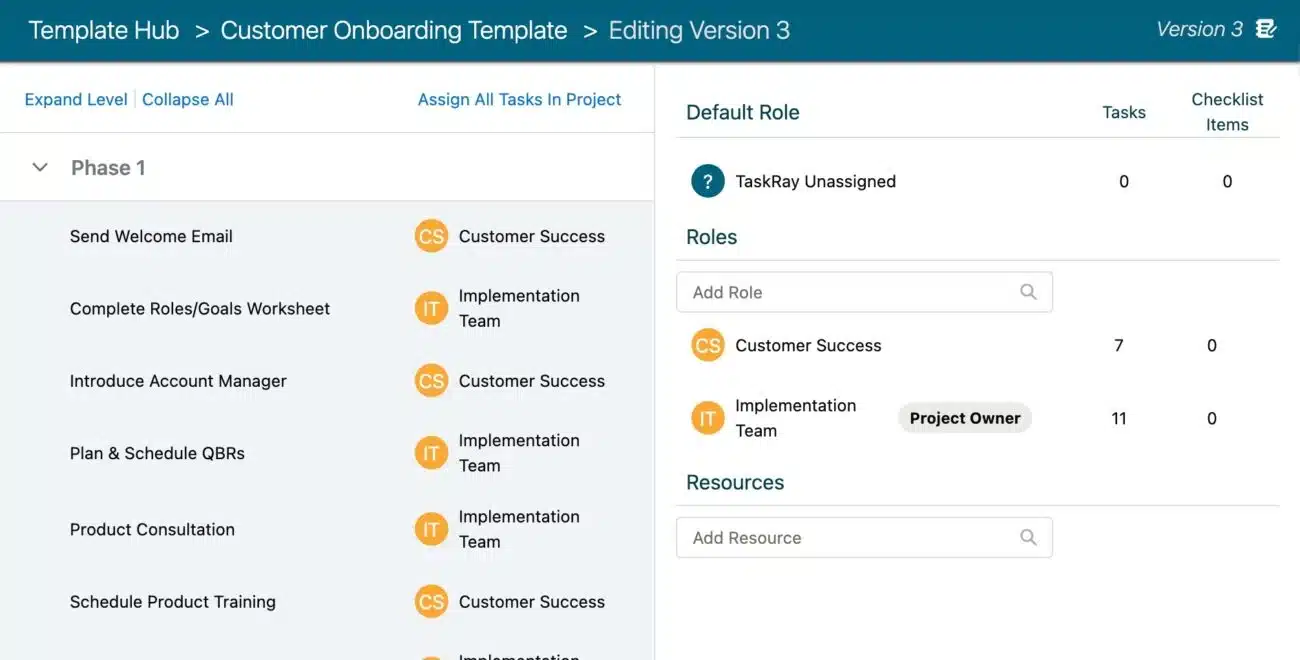
Unclear task ownership creates bottlenecks. A role map becomes part of the kickoff template, so every stakeholder knows who holds the next step. One simple scheme assigns “Lead” for the person accountable for the phase and its outcome, “Support” for active contribution, and “Monitor” for awareness and check-in responsibility, and every cell in the role map uses one of those three terms. Who holds the Lead role for each phase is organization-specific. For example, on SAP projects, functional consultants configure the system to fit business processes, while technical consultants handle custom development and integrations, and other platforms split the work differently.
| Delivery Team Role | Kickoff | Discovery | Configuration | UAT and Go-Live | Stabilization |
|---|---|---|---|---|---|
| Implementation manager | Lead | Lead | Monitor | Lead | Lead |
| Functional or technical consultant | Support | Support | Lead | Support | Support |
One example assignment pattern. Confirm each cell against your own delivery org, since teams adjust phase-by-phase ownership to fit their staffing model. Implementation managers typically have significant involvement in UAT and go-live, but frameworks don’t standardize their Lead designation, so treat that row’s Lead cells as examples. Ownership during stabilization isn’t standardized either. After implementation, a structured handoff moves full context on the customer’s setup, goals, use cases, and open items to the customer success manager, so agree on who leads stabilization and when that handoff happens. The map covers delivery team roles only, so agree on the executive sponsor’s responsibilities with the customer at kickoff.
The master checklist below covers all 15 tasks across the pre-kickoff handoff and the five phases, and is ready to adapt to your delivery org. Encode it as a project template in your project tool rather than maintaining it as a static document, so no project manager (PM) has to rebuild the plan for each new customer. For examples, see more customer onboarding resources from TaskRay.
| Phase | Task | Example Owner | Example Exit Criterion |
|---|---|---|---|
| Pre-Kickoff | Sales-to-delivery handoff meeting held | Sales lead and implementation manager | Knowledge from the sales cycle shared with the delivery team, with pre-sale commitments documented |
| Pre-Kickoff | Project created from closed opportunity (manually or by automation) | Salesforce admin or sales operations, with implementation manager review | Project record created with account details and scope |
| Kickoff | Kickoff meeting held with the customer | Project manager or implementation manager, whoever leads the kickoff | Mutual action plan agreed with the customer, go-live date confirmed or flagged as a risk with a plan to confirm it |
| Kickoff | Stakeholder map documented with the customer | Implementation manager or project manager, whoever owns customer stakeholder mapping | All customer stakeholders named with roles, contact info, and their part in decisions, with gaps flagged for follow-up |
| Discovery | Technical requirements gathered with the customer | Technical consultant or implementation manager, whoever leads requirements gathering | Requirements document reviewed and signed off by the customer |
| Discovery | Access credentials received and verified | Customer project lead or technical consultant, whoever coordinates access requests | Access to required systems granted and confirmed working by the delivery team, with any gaps logged |
| Discovery | Data migration plan documented | Technical consultant or implementation manager, whoever owns migration planning | Migration plan documents scope, timeline, sequencing, and named owners for each migration task |
| Configuration | Solution configured and internally tested per requirements | Functional or technical consultant, or implementation manager, whoever leads configuration | Configuration complete against the requirements document and internally tested, with open defects logged |
| Configuration | Integrations built and validated | Technical consultant | Integrations pass agreed test scenarios |
| UAT | UAT test cases executed | Customer project lead | Critical test cases pass or carry documented workarounds |
| Go-Live | Go/no-go decision made | Implementation manager | Agreed go-live criteria met, with customer sign-off |
| Go-Live | Cutover executed | Technical consultant | Production environment live, with a rollback plan in place |
| Stabilization | Adoption monitoring active | Implementation manager | Usage metrics reviewed weekly through stabilization |
| Stabilization | Issues triaged and resolved | Implementation manager | Critical issues resolved or escalated with a plan |
| Stabilization | Handoff to customer success complete | Implementation manager | Customer success confirms readiness to take over |
Owners and exit criteria are starting assignments, not fixed standards. Published methodologies don’t define them for the pre-kickoff rows, and ownership of kickoff, discovery, configuration, and stabilization tasks varies by team, so agree on customer-side assignments, issue triage, and the customer success handoff at kickoff. The project creation step is organization-specific and depends on how your team sets up its CRM and project tool. The pre-kickoff rows are pre-work that feeds the kickoff phase, not a separate phase in the five-phase lifecycle. Adjust each cell to your delivery org before encoding the checklist as a project template. Published implementation phase frameworks describe the discovery phase but don’t define customer-side ownership.
Onboarding risk often starts in the sales-to-delivery handoff. When a deal closes, someone copies account details and commitments from the CRM into a separate project tool, and information can get lost in the transfer. The fields that must transfer: account details, pre-sale commitments (including informal ones), product scope, timeline expectations, named customer stakeholders, and any custom terms or technical dependencies.
The fix for “what did sales promise them?” is a structured handoff template that makes pre-sale commitments explicit before kickoff. A complete handoff document includes customer goals, deal context, a stakeholder map, open risks, and links to sales artifacts such as call recordings, proposals, and signed contracts.
The kickoff is where you build the mutual action plan. It must accomplish an agreed stakeholder map, scope confirmation, timeline agreement, communication cadence, and risk identification. A strong kickoff meeting agenda covers introductions, agreed deliverables and success metrics, project timeline and milestones, roles and points of contact, known risks, and next steps with follow-up cadence.
Encode the workflow once, so the tenth implementation runs the same sequence as the first. Configuration, integration, data migration, and UAT each carry their own checklist, covering items such as integration testing, data validation, and defect resolution, and you can encode each one as a task group in the project template so no PM rebuilds the plan for a new customer. TaskRay’s approach to creating templates and new projects in Salesforce walks through encoding a project plan as a reusable template.
The go-live date is a milestone, not the end, so cutover tasks, go/no-go criteria, customer sign-off, and the transition to ongoing success all need owners and exit criteria. Define go/no-go criteria before the date so the decision rests on documented readiness rather than gut feel. The go-live planning process includes hypercare, the post-launch stabilization period where teams provide elevated support and resolve issues quickly before transitioning to steady-state operations.
Customers who keep reaching their value milestones after go-live put you in a stronger position to secure the renewal, while weak post-go-live adoption leads them to question whether the solution delivers the value they expected and to consider other vendors. Wyzowl found that 86% of people say they would be more likely to stay loyal to a business that invests in onboarding content, based on a survey of 216 respondents in early 2020, so treat the figure as directional support for the retention case rather than a guarantee. Post-go-live stabilization and the handoff to customer success can help turn a technical launch into a customer who renews, because stabilization is when adoption issues surface and get resolved before they become churn signals. Hypercare typically runs 2 to 6 weeks and ends when agreed exit criteria are met, while complex ERP-style implementations can run 8 to 12 weeks.
The kickoff template is a structured agenda with time allocations for each segment, and the walkthrough segment assigns a named owner to every client task. You can reuse it for each new customer instead of rebuilding it from scratch.
Some discovery work starts before the kickoff, and the full Discovery phase continues after it. What to gather beforehand, where you can: technical requirements, access credentials, stakeholder map, and success criteria. The handoff from sales should include links to call recordings, proposals, and signed contracts, so the delivery team doesn’t start from zero. Gathering this early helps keep the kickoff from becoming a discovery session, which can delay go-live.
A 60-minute kickoff agenda has five segments, with suggested timings:
The mutual action plan puts the customer’s definition of success and the delivery team’s timeline on one shared view, anchored to a specific milestone with a date, so you align on the outcome and plan before any configuration work begins.
Tie goals to specific milestones and dates. Onboarding guidance commonly structures customer onboarding as a 30-60-90 day plan with milestones. A goal such as “Customer reaches first value milestone within 30 days of go-live” is measurable, while “customer is happy” is not. The 30-day window is an example, so set it to match your product and customer. Every goal should have a date, an owner, and a way to measure it. The mutual action plan becomes the reference for evaluating scope changes, so you can assess them against what was agreed at kickoff.
Four templates support the master checklist at different stages: requirements mapping, sales-to-delivery handoff, the RAID log, and post-go-live stabilization. Start with all four and remove any that don’t apply to your delivery model. For example, remove the requirements mapping template if your product ships with a fixed configuration and the customer has no custom requirements to trace.
Requirements traceability maps each customer need to a specific configuration task, owner, and acceptance criterion. When a customer requests a change, you can trace it back to the original requirement and assess the impact on timeline and capacity. The requirements document becomes the reference for UAT and go-live sign-off, so there’s less ambiguity about what was committed.
The handoff template must include: account details, pre-sale commitments, product scope, timeline expectations, named customer stakeholders, and any custom terms. Assign every commitment a named owner on the delivery side, so nothing agreed during the sale goes unassigned once the project starts.
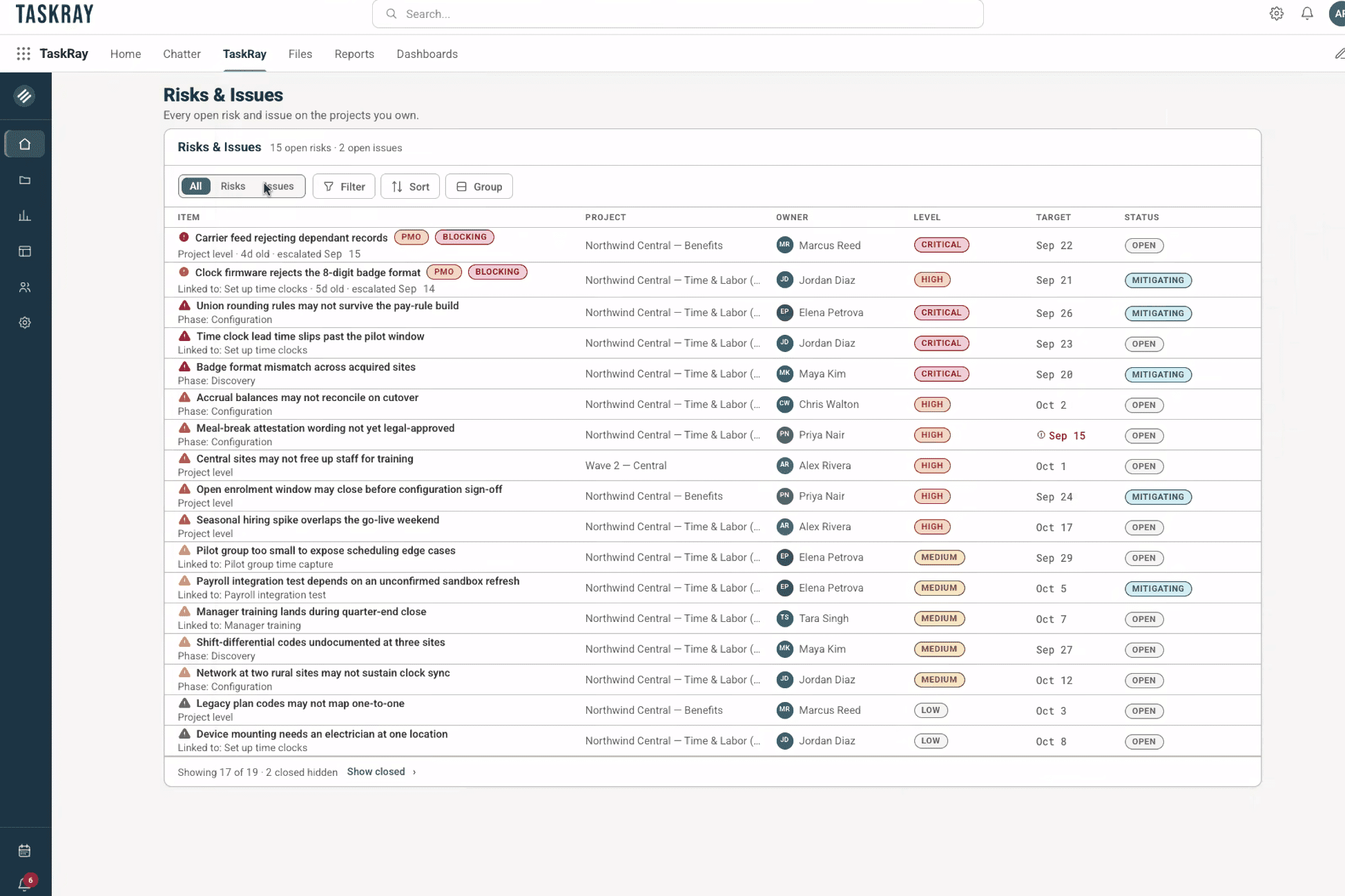
A RAID log is the single running record holding all four RAID categories with an ID, description, owner, date raised, status, and next step per entry. Assign each entry an owner, a severity rating, and a review cadence, with the implementation manager walking the open risks and issues weekly during status calls, converting materialized risks into issues and re-testing assumptions at each milestone. The RAID log is easier to keep current when it lives in the same system as the project plan, because entries get updated where the delivery work already happens, but where it lives doesn’t guarantee updates, so the regular review cadence is what keeps it accurate.
The stabilization checklist captures the post-go-live monitoring and handoff tasks that help turn a technical launch into a customer who adopts and renews. Key stabilization tasks include resolving critical errors, confirming integrations, reviewing access permissions, validating migrated data, and establishing a support process. Track adoption metrics intensively throughout stabilization, with weekly reviews.
The master checklist is the standard path. Variation by customer size, product complexity, regulatory requirements, and geography should be encoded in the template, not invented per account.
Project templates with conditional branches or optional phases handle variation without rebuilding the plan. TaskRay’s approach to creating scalable systems walks through how templates handle variation without losing standardization.
A new PM can run the same onboarding motion without relying on the person who built it, because the customer onboarding checklist template is the runbook.
Growing the number of concurrent implementations changes capacity planning, portfolio-level dashboards, and the need for reporting that pulls live data without manual assembly. Three capabilities let the team absorb more accounts without proportional setup overhead. First, project templates encode the standard path, so setup work doesn’t grow with each new account. Second, resource allocation views show who is overcommitted before projects slip. Third, portfolio dashboards that pull live data replace the Friday afternoon status reports someone would otherwise assemble by hand.
Scope creep surfaces late because changes go untracked until they have consumed unplanned capacity. A formal change control process with a named owner and documented impact assessment helps prevent that conversation from happening after the capacity is already consumed. Every scope change request gets logged, assessed for impact on the go-live date and critical path, and presented to the customer with the timeline tradeoff before approval, so the customer understands the cost before choosing.
The question “who is overallocated this sprint?” should have an answer from a dashboard, not a status meeting. When resource allocation is invisible across projects, you cannot see who is overcommitted until someone raises a flag.
When two projects compete for the same resource, a portfolio dashboard showing all active projects and their health makes the tradeoff visible, so you decide based on risk, not which customer yelled louder.
Integration failures and access delays stall onboarding. The fix is keeping project data in the same system as the customer record. When project data lives in the same system as the customer record, there is no sync to break, and the status you report is the status in the CRM. Native Salesforce apps don’t need API calls to read or write data within Salesforce because they operate on the same platform, while integrated approaches require a connector that can break. A native managed package runs inside the customer’s org with no external integration layer to maintain or break. Because TaskRay is a managed package, project records inherit your org’s permission sets and sharing rules without a parallel permission model to build or maintain.
TaskRay is a Salesforce-native project management platform purpose-built for post-sale delivery. When a deal closes in Salesforce, TaskRay can auto-launch a project using the data already in the opportunity record, so no one copies account details into a separate tool. RAID tracking lives in the same Salesforce org as the project, and portfolio dashboards pull from standard Salesforce Reports. Customers get a shared portal to see project status, submit inputs, and review milestones without needing a Salesforce license. FieldEdge by Xplor cut time-to-go-live from 120 days to 70-80 days after standardizing their onboarding workflows in TaskRay, and the same template structure is now reused for every new customer.
See how TaskRay can help your team deliver customer projects more efficiently. Request a demo today.
Five phases (kickoff, discovery, configuration, UAT and go-live, post-go-live stabilization), each with named owners, deliverables, and exit criteria, plus a RAID log and a handoff template that captures pre-sale commitments.
Enterprise onboarding time varies with product complexity, data migration scope, and regulatory requirements, so the kickoff-to-go-live timeline gets agreed at the kickoff meeting.
The implementation manager, technical consultant, customer success manager, and the customer’s project lead, so the people who own scope, timeline, and success criteria agree on them in the room. The customer success manager typically owns the customer relationship after the sale, including adoption, retention, expansion, and renewals, so attending kickoff gives them the context they need when the handoff arrives. How responsibilities are split between customer success and delivery varies by team, so confirm it internally. The customer’s executive sponsor often joins enterprise kickoffs, but sponsor attendance at kickoff or any other phase varies by customer, so confirm it with the customer when you schedule the meeting.
Use a portfolio dashboard that pulls live milestone data from the same system as the project plan, so leadership sees current delivery health without manual status assembly.
The kickoff template covers the meeting agenda and agreed stakeholder roles, while the full checklist covers the pre-kickoff handoff and all five phases through post-go-live stabilization.
Go-live date: The date the customer’s implementation moves to production. The customer’s first defined value milestone is a separate event that follows go-live, and its timing varies by product, customer, and segment.
Sales-to-delivery handoff: The transfer of account details, pre-sale commitments, and scope from the sales team to the delivery team when a deal closes.
RAID log: A register of risks, assumptions, issues, and dependencies, each with an owner, severity rating, and review cadence.
Mutual action plan: A shared document that aligns the customer’s definition of success with the delivery team’s timeline and milestones, serving as the reference for evaluating scope changes and holding both parties accountable.
Change control: A formal process for assessing and approving scope changes before they consume unplanned capacity.
Critical path: The sequence of dependent tasks that determines the earliest possible go-live date.
Stabilization period (hypercare): The post-go-live window during which the delivery team provides elevated support, monitors performance, triages issues, and transitions the customer to ongoing success.

